Apparel Product Photography: How Fashion Brands Stay Consistent at Scale
How fashion brands photograph apparel at scale: lighting, shooting workflows, color accuracy, and keeping 500+ SKUs visually cohesive.
There's a gap between knowing how to photograph one garment and knowing how to photograph apparel at scale. Most guides cover the first part — the lighting, the camera settings, the flat lay technique. Very few address what happens when you're shooting 50 new SKUs every month across multiple categories, multiple seasons, and multiple photographers.
This guide is for sellers and brands who already have the basics down. You know how to light a shirt. What you need is a system that produces the same quality and the same look across hundreds of products, month after month, without your catalog drifting into visual chaos.
If you're still learning the fundamentals, start with our clothing photography guide for flat lay, mannequin, and on-model methods, then come back here for the scaling playbook. For the broader system that applies to any product type at scale, see our catalog photography guide.
Why Apparel Photography Is Different from General Product Photography
Apparel introduces variables that don't exist with hard products. A candle sits on a table and stays there. A shirt wrinkles differently every time you touch it. A dress drapes based on humidity, fabric weight, and how long it's been hanging. Color rendering on textiles is harder than on plastic or metal because fabric absorbs and scatters light rather than reflecting it cleanly.
These variables multiply at scale. If you're shooting 20 garments in a session, tiny inconsistencies in steaming, styling, and lighting accumulate into a catalog that looks like it was photographed by five different people — even when it was one person on one day.
The solution isn't better equipment. It's a tighter process. Everything below is about building that process.
Building a Repeatable Apparel Photography Workflow
Step 1: Define Your Visual Standard
Before you photograph anything, document what "good" looks like for your brand. This means deciding:
Background standard. White seamless paper is the default for marketplace compliance. If you sell on Amazon, pure white (RGB 255,255,255) is mandatory for main images. If you sell on your own Shopify store, you have flexibility — but pick one background and commit. Mixing white and lifestyle backgrounds within the same product category makes your catalog look disjointed. See our white background photography guide for the technical workflow.
Shooting method per category. Flat lay for casual basics (tees, tank tops, shorts). Ghost mannequin for structured garments (blazers, button-downs, dresses). On-model for hero products or premium lines. Document which method applies to which category — and don't deviate.
Styling rules. How are collars presented? How far are sleeves folded? Where do pins go? What's the spacing between the garment edge and the frame? Write a one-page styling guide with reference photos. Every person who touches the garments during a shoot should have a copy.
Color targets. Set a reference standard for whites, blacks, and your brand's key fabric colors. Shoot a color checker at the start of every session. This becomes your calibration reference in post-production and ensures that a navy blue shirt photographed in January matches a navy blue shirt photographed in June.
Step 2: Standardize Your Lighting Setup
For apparel at scale, consistency matters more than creativity. You want lighting that produces accurate colors, even illumination, and minimal shadows across every garment type.
The recommended setup: Two softboxes at 45-degree angles — 24"x36" minimum for flat lay and mannequin work, 47"+ (120cm) for full-body on-model shoots. Position them 2-4 feet from the subject. Key light slightly above the garment, fill light at garment height at 60-70% power. A third light on the background if you need pure white.
This is the same two-light foundation covered in our product photography lighting guide, scaled up with larger modifiers to cover full garments.
Lock your light positions with tape marks. Every session starts by placing lights on the exact same marks. Measure light-to-subject distance with a tape measure — don't eyeball it.
Set color temperature to a fixed Kelvin value. 5500K for daylight-balanced LEDs. Never use auto white balance — it shifts between shots and between sessions, creating the exact inconsistency you're trying to eliminate.
Step 3: Create a Shot List Template
For each SKU, define the required shots before anyone picks up a camera:
Marketplace listings (minimum 5 images):
- Front view — straight-on, centered
- Back view — same framing as front
- 45-degree angle — shows fit and dimension
- Detail shot — fabric texture, buttons, stitching, label
- Scale/size reference — on model or with measurements overlay
For your own Shopify store, add:
- Lifestyle/styled shot — garment in context
- Color variants — if multiple colorways, each gets the same front shot
This shot list becomes a checklist that every photographer follows for every SKU. No improvisation, no "I think we got enough" — the list defines done.
Step 4: Batch by Category, Not by Order
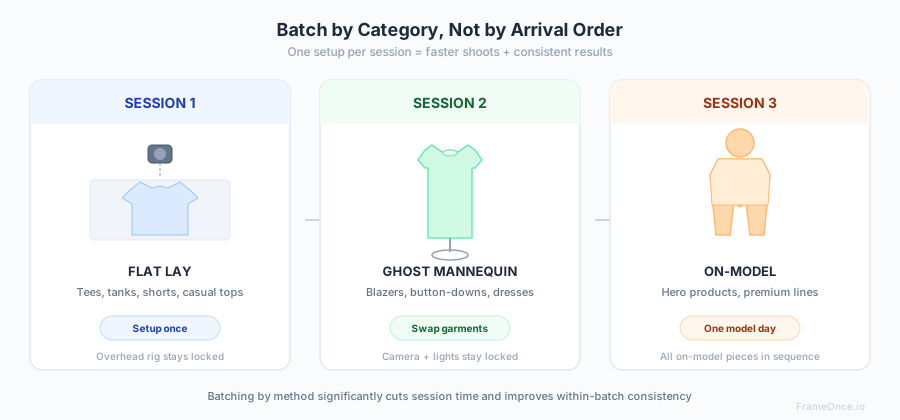
The most common mistake in high-volume apparel photography: shooting products in the order they arrived from the manufacturer. This means you're constantly switching between flat lay, mannequin, and model setups — wasting time on setup changes and introducing inconsistency.
Instead, batch by method:
Session 1: All flat lay items. Set up the overhead camera once, lay and shoot every casual top, every basic tee, every pair of shorts.
Session 2: All mannequin items. Dress the mannequin once, keep the camera locked, swap garments through.
Session 3: Model day. Book the model for one concentrated session and shoot every on-model piece in sequence.
This approach significantly cuts session time and dramatically improves consistency within each batch.
Camera Settings for Apparel Photography
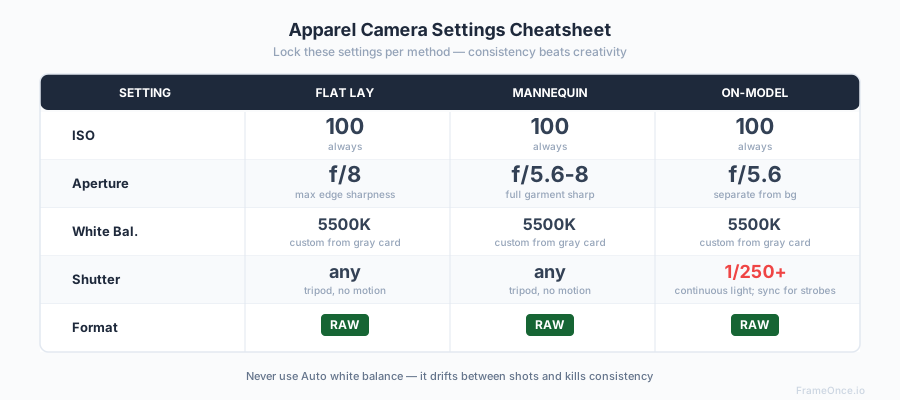
Apparel requires tighter control over settings than most product categories because fabric colors are the most common source of customer complaints and returns.
ISO: 100. Always. Noise in product photography is unacceptable, and apparel fabrics show noise more than hard surfaces.
Aperture: f/8 for flat lay (maximum sharpness edge to edge). f/5.6-f/8 for mannequin. f/5.6 for on-model (slightly shallower depth of field separates the model from the background).
White balance: Custom white balance from a gray card, set at the start of every session. This is one of the most important steps for color accuracy — alongside consistent lighting and a calibrated monitor. Auto white balance will drift between shots and make your navy look different from frame to frame.
Shutter speed: Whatever your exposure requires at ISO 100 and your target aperture. On a tripod, this doesn't matter — 1/30 is fine. For on-model with continuous lighting, stay above 1/250 to freeze movement. With strobes, the flash duration (often 1/1000s or faster) freezes motion regardless of shutter speed — just stay at or below your camera's sync speed (typically 1/160-1/250).
File format: RAW. Non-negotiable for professional apparel work. RAW gives you full control over white balance, exposure, and color in post-production. JPEG bakes these decisions in permanently.
For a complete camera settings reference across all product types, see our product photography equipment guide.
Color Accuracy in Apparel Photography
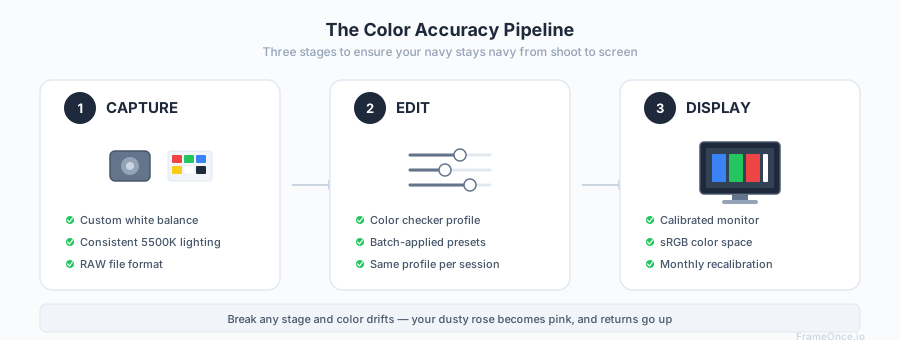
Color accuracy is where apparel photography succeeds or fails commercially. A customer who receives a "dusty rose" shirt that looks pink on their screen will return it — and leave a review about inaccurate photos.
The Color Pipeline
Capture accurately. Custom white balance + consistent lighting + RAW files = accurate starting point.
Edit consistently. Apply the same color correction profile (built from your color checker reference) to every image in a batch. In Lightroom, this means creating a custom camera profile and applying it as a preset.
Display correctly. Your editing monitor should be calibrated. Even a basic calibration tool ($150-$200) prevents the scenario where colors look right on your screen but wrong on everyone else's.
Handling Difficult Colors
White garments trick your camera's meter into underexposing. Increase exposure by +2/3 to +1 stop compared to your standard setting. Check the histogram — whites should be bright but retain detail (around 240-250 RGB, not clipped at 255).
Black garments cause the opposite problem — overexposure that washes out to dark gray. Decrease exposure by -1/3 to -2/3 stop. The fabric should show texture and dimension, not a flat black void.
Saturated colors (reds, oranges, deep purples) can clip in one channel before others, creating unnatural-looking oversaturation. Shoot slightly underexposed and recover in post-production. RAW files handle this well; JPEG files do not.
On-Model Apparel Photography
On-model photography is the gold standard for showing how apparel fits and moves on a real body. It's also the hardest method to keep consistent at scale.
Model selection matters for consistency. If you use different models across sessions, your catalog will look fragmented. Choose one or two models per demographic and stick with them across seasons. The consistency in body type, posture, and energy creates a cohesive visual identity.
Direct poses, don't improvise. Create a pose guide with 4-5 standard poses that work across your garment types. Front-facing with arms slightly away from the body, three-quarter turn, and a walking shot are the essentials. Have your model practice the poses before the shoot starts.
Control the background. On-model shots on seamless paper are the safest choice for marketplace compliance and catalog consistency. If you're shooting lifestyle on-model, keep the location and styling consistent across the full collection.
Scaling Post-Production for Apparel Catalogs
At 10 products per month, you can manually edit each image. At 50+ products per month, manual editing becomes a bottleneck that slows launches, creates inconsistency, and burns out whoever's doing it.
The Manual Approach (1-50 SKUs/month)
Build Lightroom presets for each shooting scenario (flat lay on white, mannequin on white, on-model). Apply the preset to every image in a batch, then fine-tune individual exposures and colors. Expect 3-5 minutes per image for basic editing, 15-30 minutes for ghost mannequin compositing (less with Photoshop actions and practice).
The Automated Approach (50+ SKUs/month)
This is where catalog consistency tools become essential. Instead of adjusting each image manually, you define your visual standard once — the exact exposure, white balance, shadow behavior, and background tone you want — and apply it programmatically across every image.
FrameOnce is built for exactly this workflow. You perfect one apparel photo — getting the lighting, color, and consistency exactly right — save it as a Style Preset, and apply that standard across your entire batch. FrameOnce analyzes each of your real garment photos individually and makes the specific adjustments needed to match your preset, accounting for the variations in lighting and color that inevitably creep in across sessions. It enhances the photos you took; it does not generate fake garments, fake models, or fabricated scenes (read our policy).
The result: a catalog where the first SKU you photographed in January looks like it was shot in the same session as the 200th SKU you photographed in March.
What does professional editing cost vs. automated tools? Our product photography pricing guide breaks down the full cost spectrum.
Marketplace Requirements for Apparel Images
Amazon Apparel
Amazon's apparel image requirements are stricter than general product categories. Main image must show the garment on a human body or ghost mannequin — flat lays are not allowed for the primary image in most apparel categories. Background must be pure white. The garment must fill 85% of the frame. No visible mannequin in the main image (ghost mannequin composite required). For the full category-by-category requirements — swatch images, model poses, lifestyle restrictions — see our Amazon product photography requirements guide.
Shopify
No background requirements, but consistency across your store matters for conversion. Use the same image dimensions (2048x2048px recommended), the same padding around garments, and the same background treatment for every product. See our Shopify product image size guide for all specifications.
Etsy
Etsy gives the most creative freedom. The algorithm favors listings with 5+ images, and lifestyle/styled photography performs well for handmade and small-brand apparel. However, your first listing image should still be a clean, clear product shot — save the lifestyle images for positions 2-5.
What to Do Next
If you're photographing apparel at any volume, the investment in a repeatable system pays for itself within the first month. The time saved by not re-inventing your setup every session, the returns avoided by accurate color representation, and the conversion improvement from a cohesive catalog all compound.
Start by documenting your current process — or lack of one. Write the styling guide, set the shot list template, mark your light positions. Then batch your next shoot by category and see how much faster and more consistent the results are.
For the photography fundamentals, our product photography setup guide covers the workspace. For specific clothing techniques, the clothing photography guide walks through flat lay, mannequin, and on-model methods step by step. For lighting details, the lighting guide has the complete softbox positioning reference.
And when your catalog grows beyond what manual editing can handle consistently, FrameOnce is here to close that gap.
FrameOnce Team
FrameOnce Team
Related Articles
Clothing Photography: How to Photograph Clothes for Your Online Store
How to photograph clothes for your online store: flat lay, mannequin, and on-model techniques with lighting, camera settings, and tips for catalog consistency.
How to Photograph Shirts: Flat Lay, Mannequin & Model
How to photograph shirts and clothing for ecommerce: flat lay, ghost mannequin, and on-model methods with lighting setups, camera settings, and styling tips.
Catalog Photography: How to Keep 100+ Product Photos Looking Like One Cohesive Brand
Keep 100+ product photos looking cohesive: workflow, lighting standards, color management, and tools for ecommerce sellers at scale.
Stay Updated
Honest product photography tips delivered to your inbox. FrameOnce enhances the photos you take, real photos, never generated.