Clothing Photography: How to Photograph Clothes for Your Online Store
How to photograph clothes for your online store: flat lay, mannequin, and on-model techniques with lighting, camera settings, and tips for catalog consistency.
Clothing photography is one of the most searched topics in ecommerce photography — and for good reason. Clothes are among the hardest products to photograph consistently. They wrinkle, they drape differently on every surface, and colors shift between sessions when your lighting isn't locked down.
This guide covers photographing clothing for your website, Etsy listings, or Shopify store, walking through the three main methods — flat lay, ghost mannequin, and on-model — with the specific setups, camera settings, and consistency techniques that produce professional results across an entire catalog. Whether you're photographing t-shirts, dresses, jackets, or accessories, the fundamentals here apply.
New to product photography? Start with our complete product photography guide for the full ecommerce photography foundation, then come back to this guide for clothing-specific techniques.
How to Photograph Apparel for Your Online Store
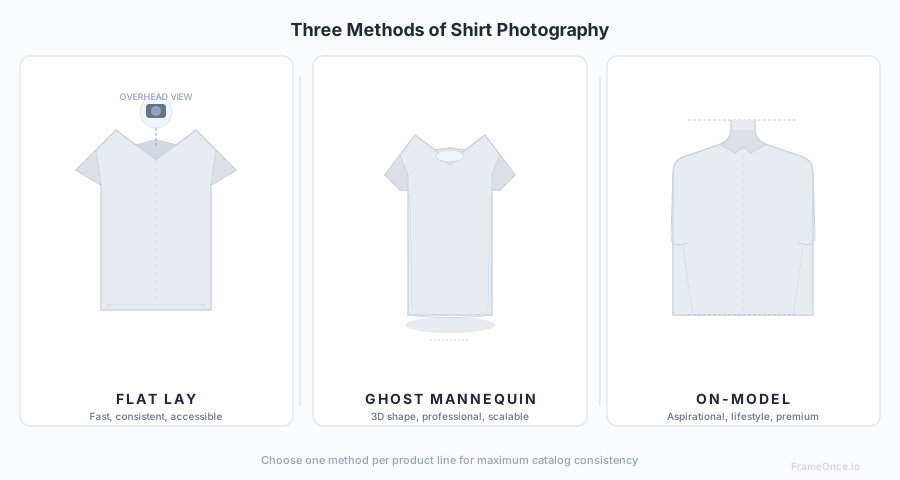
Before you touch a camera, the most important decision in clothing photography is your shooting method. Each method has different strengths, costs, and use cases — and the worst mistake most sellers make is mixing methods within the same product category.
Best Way to Photograph Clothing
There is no single best way to photograph clothing — the right method depends on your product, budget, and platform. Flat lay is best for casual tops and graphic tees. Ghost mannequin is best for structured garments and Amazon compliance. On-model shots are best for premium brands and lifestyle contexts. The table below maps each method to its ideal use case, and the sections that follow walk through the full setup for each.
| Method | Best For | Cost | Consistency | Speed |
|---|---|---|---|---|
| Flat Lay | T-shirts, casual tops, kids' clothing | Low | High | Fast |
| Ghost Mannequin | Dress shirts, structured garments, Amazon listings | Medium | Very High | Medium |
| On-Model | Premium fashion, lookbooks, lifestyle brands | High | Lower at scale | Slow |
The rule: pick one primary method for your catalog and use it for every product in that category. A catalog that mixes flat lay and ghost mannequin images without reason looks amateur — not because either method is wrong, but because the inconsistency signals carelessness.
Flat Lay Clothing Photography
Flat lay is the most accessible and fastest method for clothing photography. The garment lies flat on a surface and is photographed from directly above.
Equipment for Flat Lay
- Flat surface (table, floor, or foam board)
- White or neutral background material
- Camera or smartphone on a tripod or overhead mount
- Two soft LED lights or a large window
- Steamer or iron
- Styling clips (binder clips)
Step-by-Step Flat Lay Setup
1. Steam every piece immediately before shooting
Wrinkles are the number one quality killer in flat lay clothing photography. Steam the garment immediately before laying it — not 30 minutes before. Fabric re-wrinkles fast, especially in dry environments or after handling.
2. Lay the background
Use white seamless paper, foam board, or matte fabric. Ensure it extends beyond your frame — edges showing in the final image make any listing look cut-rate. For colored backgrounds, use matte materials to avoid reflections.
3. Lay and style the garment
Standard flat lay position for shirts and tops:
- Collar centered at top of frame
- Sleeves folded symmetrically at 45 degrees inward (or extended for casual brands)
- Body smoothed completely flat — no bunching
- Hem straight and parallel to the bottom of the frame
Use styling clips underneath the garment to hold it in position without any visible hardware.
4. Set up your lighting
Two softbox LED lights at 45-degree angles on either side, elevated to 4 feet above the surface. This eliminates harsh shadows while keeping enough contrast to show fabric texture.
If using natural light: large north-facing window with a white foam reflector on the opposite side to fill shadows. Shoot at the same time every day to keep color temperature consistent.
5. Camera position and settings
Camera directly overhead, lens parallel to the surface — any angle creates distortion. Use a boom arm or tripod with an extending arm for overhead shots.
- White balance: Fixed Kelvin (5500K for daylight-balanced LEDs)
- ISO: 100–200
- Aperture: f/8–f/11 for edge-to-edge sharpness
- Focus: Manual, locked at the center of the garment
Common Flat Lay Mistakes
- Uneven sleeves — measure the fold angle on both sides, every shot
- Visible clips or pins — always hide them underneath the garment
- Shirt not centered — use guide marks on your background surface
- Inconsistent spacing — same margins around the garment in every shot
- Collar curl — steam it immediately before shooting, and again if it re-curls
Ghost Mannequin Clothing Photography
The ghost mannequin (or invisible mannequin) technique gives garments a 3D shape as if worn by an invisible person. This is the industry standard for Amazon, dress shirts, structured garments, and any catalog that needs a professional look without model costs.
Equipment for Ghost Mannequin
- Headless mannequin torso with removable sections
- White paper sweep or backdrop
- Two to three LED softboxes
- Steamer
- Pins and clips for fitting adjustments
- Camera on a tripod at chest height
Step-by-Step Ghost Mannequin Setup
1. Steam and dress the mannequin
Steam thoroughly. Button all buttons. Pull the garment fully onto the mannequin and smooth it. Use pins at the back to pull the shirt taut — pins should not create visible tension lines at the front. Shoulder seams should sit exactly at the mannequin's shoulder edges.
2. Three-point lighting
- Key light: Large softbox at 45 degrees left, slightly above the mannequin
- Fill light: Softbox at 45 degrees right, at 60–70% of key light brightness
- Background light: Aimed at the white background to blow it out to pure white
This creates gentle, dimensionally-honest shadows that give the garment structure while keeping the background clean.
3. Camera position
At the midpoint of the garment — roughly chest height. Lens level with the garment, not angled up or down. Use a 50–85mm focal length to minimize distortion.
4. Shoot all required angles
For a complete product listing: front straight-on, back, 45-degree angle (optional, shows fit), plus detail shots — collar, buttons, fabric texture, label.
5. Post-processing: removing the mannequin
The ghost effect requires compositing in post:
- Shoot the garment on the mannequin (front and back)
- Shoot the inside of the collar/neckline separately (shirt laid flat or inside-out on a mannequin base)
- In Photoshop: mask out the mannequin and composite the inner collar shot to create the hollow 3D effect
This process adds 10–20 minutes per garment in post-production, but it produces the most professional result for structured clothing.
On-Model Clothing Photography
On-model shoots produce the most aspirational product images and the highest conversion rates for premium apparel — but they require the most resources.
Equipment for On-Model
- Model (or fit model for catalog consistency)
- White or branded background
- Full 3–4 light setup
- Steamer and styling kit
- Camera with portrait-length lens (85mm+)
Key Principles for On-Model Consistency
Use the same model for all catalog work. Different models with different body types make a catalog look inconsistent, even when individual images are technically strong. For men's and women's lines, one model per gender for the full catalog.
Standardize the pose. Create a written pose guide with 3–4 standard positions. Every garment gets photographed in the same poses, in the same order:
- Standing straight, arms at sides (catalog standard)
- One hand in pocket (casual)
- Three-quarter turn (shows fit)
Lock the crop. Mark the model's floor position with tape. Keep the camera at the same distance and height for every shot. Every image should be cropable to the same frame without adjustment.
Camera Settings for On-Model Shoots
- Focal length: 85–135mm (avoids the distortion of wide-angle lenses)
- Aperture: f/5.6–f/8 (slightly shallower depth of field than product-only shots)
- ISO: 100–200
- Shutter speed: 1/160+ to freeze any movement
Photographing Clothing Without a Mannequin
Not every seller wants to invest in a mannequin, and for casual apparel or small catalogs, you often do not need one. The goal when shooting without a mannequin is to give the garment shape and structure so it reads as a wearable object rather than a flat piece of fabric.
Stuffing techniques. The most effective mannequin-free method is filling the garment with tissue paper or foam inserts to create volume. For a shirt, crumple acid-free tissue paper and gently pack the chest, shoulders, and sleeves until the garment holds its intended shape. For pants, use rolled foam or additional tissue in the legs and waist. Stop short of overstuffing — you want the natural drape of the fabric, not a balloon effect. Smooth the surface with your hand and shoot from a slight downward angle to hide any seams where the stuffing meets the hem.
Hanger shots versus flat lay for structure. A wooden or clear acrylic hanger in front of a clean backdrop gives the garment vertical drape similar to how it hangs in a closet. This works well for dresses, coats, and structured tops where the hanger can be removed or blended into the backdrop in post. Flat lay is faster and more consistent for t-shirts and casual knits, but it compresses the garment's three-dimensional character — use it when shape is less important than showing graphics or color.
Wire frame techniques for invisible shape. For a polished mannequin-free look, build a minimal wire armature from a coat hanger and floral wire. Bend it into a rough torso or shoulder shape, insert it into the garment, and photograph against a white background. In post, clone out any visible wire. This produces a ghost-mannequin-like effect at a fraction of the cost and works especially well for dress shirts and blouses. If you sell on Amazon, remember that most apparel subcategories require the ghost mannequin or on-model look for main images — a stuffed flat lay alone will not pass compliance.
How to Photograph Clothing on a Mannequin
Mannequins are the workhorse of ecommerce apparel photography. The right mannequin choice, fit, and post-processing workflow determine whether your images look like a professional catalog or a home project.
Mannequin types. A dress form (pinnable fabric torso on a stand) is best for dressmaking and custom fitting shots. A full-body mannequin shows pants, skirts, and full outfits but takes more space and is harder to dress. A headless torso mannequin is the most common choice for Amazon and ecommerce work — it is easy to dress, compact, and designed for the ghost mannequin compositing workflow. Detachable-limb mannequins let you remove arms or neck sections to slip tighter garments on without stretching the fabric.
Fitting garments to different sizes. Your mannequin will rarely match the exact size of every garment you photograph. For items that are too small, avoid forcing them on — the resulting tension wrinkles will be obvious. For items that are too large, pull the excess fabric to the back and secure with clips or pins. A mannequin with a slightly smaller build than your average garment size tends to work best because excess fabric is easier to hide than shortage.
Hiding mannequin parts with pins and clips. Use clips along the back to create a clean front silhouette, pins to hold collars and cuffs in position, and tissue paper stuffed into sleeves and collar openings to maintain structure when the mannequin sections are removed in post. Any pin or clip visible from the front will need to be retouched, so keep hardware strictly on the back and out of the frame.
Product Shots Clothing Workflow
A repeatable workflow is what separates a catalog that looks professionally produced from one that drifts visually between sessions. Treat every shoot as an operation with the same checklist from start to finish.
Pre-shoot prep checklist. Before the first shot: steam every garment, confirm lighting positions against your floor marks, white-balance your camera with a gray card, and double-check focus on a test exposure at 100% zoom. Load your shot list with every SKU and every required angle (front, back, detail, styling option). Confirm your memory cards are formatted and backups are connected. Missing one of these steps is where most session-to-session drift originates.
Session-to-session consistency. Lock every controllable variable: camera settings written on a card taped to the tripod, light positions marked with tape on the floor, mannequin placement marked with tape or a floor sticker, and the same lens at the same focal length for every session. If you share the studio with another shoot, photograph a reference tile at the start of every session and compare it against your archive — any drift in exposure, color, or background tone tells you to recalibrate before moving on.
Post-shoot QA process. After each session, review every image at 100% zoom for focus and dust, confirm color accuracy against your reference frame, and verify background whiteness in the corners. Flag any image that fails and reshoot immediately — going back to set up the mannequin and lights again is significantly more expensive than catching issues while the setup is still live. For catalogs above 50 SKUs, a tool like FrameOnce (see below) can automate the color and background consistency check so the QA step scales with the catalog.
Lighting for Clothing Photography
Fabric is reflective and textured, which means lighting decisions have a larger impact than with hard products.
Soft light is non-negotiable. Direct, undiffused light creates harsh shadows in fabric folds and makes wrinkles look worse than they are. Always use diffused light — softboxes, shoot-through umbrellas, or window light through a diffusion panel.
Side lighting reveals texture. If you want to show fabric weave (linen, Oxford cloth, knit structures), position your key light more to the side. This creates micro-shadows in the surface texture that show the material clearly.
Front lighting flattens texture. For smooth, clean shots where fabric texture isn't the selling point, position lights closer to the camera axis for even, flat illumination.
Watch for color reflections. Bright-colored garments can cast their color onto a white background, creating a tinted halo. Increase the distance between the garment and background, or increase background light intensity to overpower the reflection. If your catalog lives on marketplaces with strict white requirements, our white background product photography guide covers the exact post-processing workflow for pushing backgrounds to pure RGB 255,255,255.
For a complete lighting deep-dive with setup diagrams, see our product photography lighting guide.
How to Take Product Shots of Clothing: Camera Settings
| Setting | Flat Lay | Ghost Mannequin | On-Model |
|---|---|---|---|
| Aperture | f/8–f/11 | f/8–f/11 | f/5.6–f/8 |
| ISO | 100–200 | 100 | 100–200 |
| White Balance | 5500K fixed | 5500K fixed | 5500K fixed |
| Focal Length | 35–50mm | 50–85mm | 85–135mm |
| Focus Mode | Manual | Manual | AF-S (single) |
| Shutter Speed | Any (tripod) | Any (tripod) | 1/160+ |
Styling Tips for Consistent Clothing Photography
Steaming Protocol
Steam every garment immediately before shooting — not beforehand. Keep your steamer plugged in and within reach throughout the shoot. For smooth synthetic fabrics, use a lower steam setting or a pressing cloth to avoid heat marks.
Collar Consistency
Decide on one collar presentation per garment type and document it:
- Dress shirts: collar spread flat with all buttons closed
- Polo shirts: one or two buttons open — pick one standard
- T-shirts: collar smoothed flat, no curl
Apply it identically to every garment. A catalog where every polo has its collar styled differently looks inconsistent even when the photography itself is excellent.
Color Exposure Adjustments
Different fabric colors require exposure compensation to render accurately:
- White garments: reduce exposure by 1/3 to 2/3 stop to prevent blowout
- Black garments: increase exposure by 1/3 to 2/3 stop to reveal shadow detail
- Bright or saturated colors: expose for the garment, not the background
Check your histogram after every color change. The goal is accurate color rendering, not just correct average brightness.
Building Consistency Across a Large Clothing Catalog
The hardest part of clothing photography isn't getting one great shot — it's making product #200 look like it belongs with product #1.
Here's what breaks consistency across large catalogs:
- Lighting drift — lights shift position between sessions, power levels get bumped
- Multiple shoot days — different times, different ambient conditions
- Different editors — each person makes slightly different white balance and exposure decisions
- Equipment changes — new lights, new backdrop, new camera body all shift the look
- Seasonal variation — summer and winter collections shot under very different conditions
Documenting Your Setup
After every element of your setup is working, document it thoroughly:
- Light positions: tape marks on the floor, photo from above
- Camera position: measured distance from subject, tripod height marked
- Camera settings: written card taped to the tripod
- Garment positioning: reference shot of how the garment sits in the frame
This setup documentation is your consistency foundation. Anyone on your team should be able to recreate your setup exactly from this documentation.
How FrameOnce Solves Catalog-Level Consistency
Even with a perfectly documented setup, you'll encounter drift. Lights move. Sessions happen under different ambient light. Multiple people edit photos with slightly different white balance judgment.
FrameOnce solves this at the catalog level. You take your best clothing photo — the one where lighting, styling, background, and color are exactly right — and save it as a Style Preset. Every subsequent clothing image you upload gets automatically matched to that reference: white balance, exposure, shadow density, and background tone.
Shirt #200 looks like it was shot in the same session as shirt #1, regardless of when it was actually photographed.
To be clear about what this is and is not: FrameOnce enhances the real garments you actually photographed. It does not generate fake clothing, fake models, or fabricated imagery. Every output starts from your own photograph — see our Real Photos policy for the full boundary.
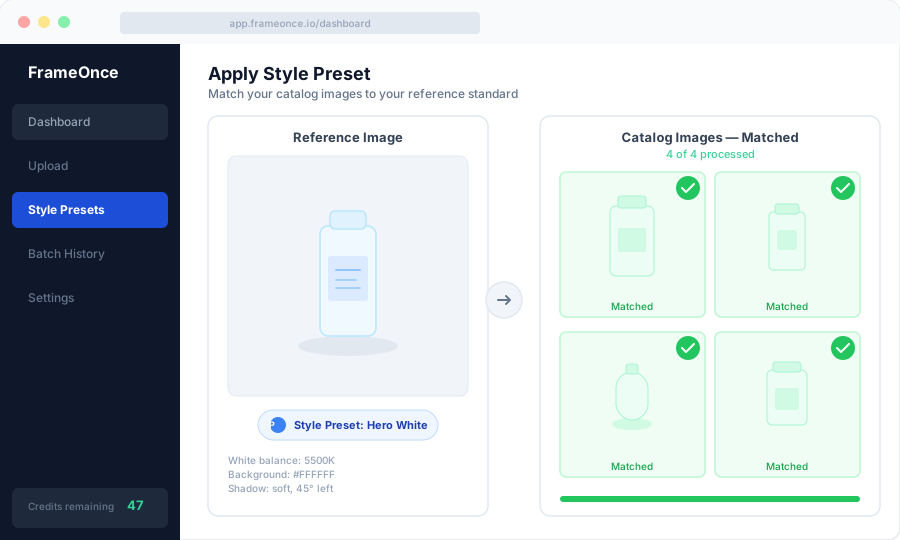
FrameOnce's free tools are live now. Run a free shop critique to see exactly where your catalog drifts, no signup needed. The full paid catalog workflow (Style Presets, batch processing, Etsy/Shopify integration) is in private testing and launches summer 2026; join the waitlist for double credits when paid plans are ready.
Clothing Photography Equipment Checklist
For a complete breakdown of what to buy at every budget level, see our product photography equipment guide. Here's the essential list:
Minimum viable clothing setup
- Camera or smartphone with tripod: $0–$800
- Two LED softboxes: $80–$200
- White foam board or paper sweep: $5–$30
- Steamer: $25–$80
- Styling clips: $5
For professional results
- Mirrorless camera (Sony a6000 series, Canon EOS R50): $600–$800
- Two large LED softboxes with stands: $150–$300
- 35–50mm lens for flat lay, 50–85mm for mannequin: $200–$600
- White seamless paper roll: $30–$80
- Headless mannequin (for ghost mannequin method): $50–$200
- Boom arm for overhead flat lay shots: $40–$100
Frequently Asked Questions
What is the best method for photographing t-shirts?
Flat lay is the most consistent and fastest method for t-shirts. It shows graphic designs clearly, maintains consistent framing across hundreds of SKUs, and is easy to reproduce without a mannequin or model. For the complete t-shirt, dress shirt, and polo workflow, see our how to photograph shirts guide.
How do I photograph dark-colored clothing?
Dark clothing tends to underexpose and lose detail in deep shadows. Use your histogram rather than the preview screen — look for shadow detail rather than correct average brightness. Increase exposure by 1/3 to 2/3 stop, add a fill light to open up shadows, and edit shadow detail in post rather than lifting the entire exposure.
Do I need a ghost mannequin for professional results?
For structured garments — dress shirts, blazers, fitted jackets — yes. The 3D effect that a mannequin creates cannot be replicated in post from a flat lay. For casual tops and t-shirts, flat lay produces equally professional results at a fraction of the cost and time.
How many clothing photos do I need per product?
A practical minimum: front, back, and at least one detail shot (collar, fabric texture, label). For fashion platforms, lifestyle or on-model shots alongside white-background images consistently improve conversion rates. Amazon allows up to 9 images per listing.
How do I keep white balance consistent across a clothing catalog?
Set your white balance manually to a fixed Kelvin value (5500K for daylight-balanced LEDs) rather than using Auto White Balance. Auto WB shifts between shots as the camera recalibrates, creating color inconsistency that's difficult to batch-correct in post.
Summary
Clothing photography comes down to three decisions: the shooting method that fits your brand and budget (flat lay, ghost mannequin, or on-model), a lighting setup that renders fabric accurately and consistently, and a documented process you can recreate every time.
The single biggest predictor of a professional-looking catalog isn't camera quality or lighting investment — it's consistency. Every garment in your store should look like it belongs in the same session. If you're scaling a fashion brand past a few dozen SKUs, our apparel photography guide covers the operational playbook for keeping hundreds of garments visually cohesive, and our product photography pricing guide breaks down when DIY stops being cheaper than outsourcing.
Ready to make your entire clothing catalog consistent? Run a free shop critique to see exactly where your photos drift today — no signup needed. Or join the waitlist for double credits when the paid catalog workflow launches summer 2026.
FrameOnce Team
FrameOnce Team
Related Articles
How to Photograph Shirts: Flat Lay, Mannequin & Model
How to photograph shirts and clothing for ecommerce: flat lay, ghost mannequin, and on-model methods with lighting setups, camera settings, and styling tips.
Apparel Product Photography: How Fashion Brands Stay Consistent at Scale
How fashion brands photograph apparel at scale: lighting, shooting workflows, color accuracy, and keeping 500+ SKUs visually cohesive.
Catalog Photography: How to Keep 100+ Product Photos Looking Like One Cohesive Brand
Keep 100+ product photos looking cohesive: workflow, lighting standards, color management, and tools for ecommerce sellers at scale.
Stay Updated
Honest product photography tips delivered to your inbox. FrameOnce enhances the photos you take, real photos, never generated.