How to Photograph Shirts: Flat Lay, Mannequin & Model
How to photograph shirts and clothing for ecommerce: flat lay, ghost mannequin, and on-model methods with lighting setups, camera settings, and styling tips.
Shirts are one of the most photographed — and most inconsistently photographed — products in eCommerce.
The fabric wrinkles differently every time you lay it out. Collars fold at slightly different angles. Colors shift between sessions because your lighting moved two inches. And when a customer scrolls through your collection, those tiny inconsistencies add up to a catalog that feels unprofessional.
This guide covers the three main methods for photographing shirts — flat lay, invisible mannequin, and on-model — with specific lighting setups, camera settings, and styling techniques that produce clean, consistent results across your entire catalog.
How to Photograph Clothes and Clothing for eCommerce
Photographing clothing for ecommerce comes down to three core decisions: your shooting method, your lighting, and how consistent your process is across every item. This guide covers all three in full.
The principles here apply across all apparel types — t-shirts, dress shirts, polo shirts, hoodies, and any garment you need to list on Shopify, Amazon, Etsy, or your own store. If you photograph non-shirt garments like dresses, jackets, or pants, our broader clothing photography guide covers flat lay, mannequin, and on-model techniques across every garment category. For a broader ecommerce photography foundation, see our complete product photography guide.
Which Method Should You Use?
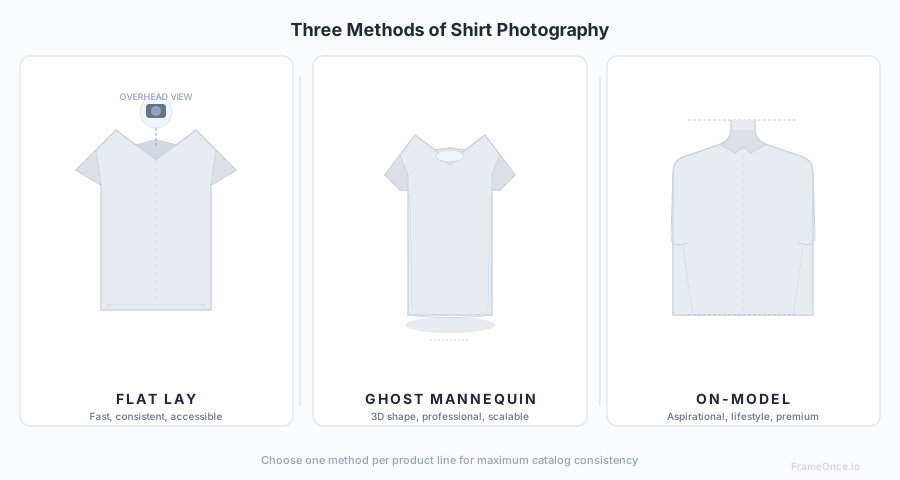
Each shirt photography method has clear strengths. Your choice depends on your budget, catalog size, and brand positioning.
| Method | Best For | Cost | Consistency | Production Speed |
|---|---|---|---|---|
| Flat Lay | Casual brands, t-shirts, graphic tees | Low | High | Fast |
| Invisible Mannequin | Dress shirts, structured garments, Amazon listings | Medium | Very High | Medium |
| On-Model | Premium brands, lifestyle positioning, lookbooks | High | Medium | Slow |
Most sellers benefit from choosing one primary method and using it for their entire catalog. Mixing methods within a single product category makes your store look disorganized.
Flat Lay Clothing Photography
Flat lay is the fastest and most accessible method. You lay the shirt flat on a surface and shoot directly from above.
What You Need
- A large flat surface (table, floor, or foam board)
- White or neutral background material
- Camera or smartphone on a tripod or overhead mount
- Two soft LED lights or a large window
- Steamer or iron
- Styling clips (binder clips work well)
Step-by-Step Setup
1. Prepare the shirt
Steam or iron every wrinkle. This is non-negotiable — wrinkles are the number one quality killer in flat lay photography. Pay special attention to collar edges, sleeve creases, and the hem.
2. Position the background
Lay your white sweep paper, foam board, or fabric flat. Ensure it's larger than your frame — you don't want edges visible. For colored backgrounds, use matte materials to avoid reflections.
3. Lay the shirt
Fold the shirt symmetrically. The standard flat lay position:
- Collar centered at top of frame
- Sleeves folded inward at a 45-degree angle (or extended outward for casual looks)
- Body smoothed flat with no bunching
- Hem straight and parallel to bottom of frame
Use styling clips underneath to hold the shirt in position without visible pins or tape.
4. Set up lighting
Position two softbox LED lights at 45-degree angles on either side, both elevated to about 4 feet above the surface. This eliminates harsh shadows while maintaining enough contrast to show fabric texture.
If using natural light, position your setup next to a large north-facing window. Place a white reflector on the opposite side to fill shadows.
5. Camera position
Mount your camera directly overhead, pointing straight down at the shirt. The lens should be parallel to the surface — any angle will create distortion. A boom arm or ceiling-mounted rig works best. For phones, use a phone mount designed for overhead shooting.
6. Camera settings
- White balance: 5500K (daylight) for LED, or match your light source
- ISO: 100-200
- Aperture: f/8-f/11 for edge-to-edge sharpness
- Focus: Center of the shirt, manual focus locked
Common Flat Lay Mistakes
- Uneven sleeves — measure the fold angle on both sides
- Visible clips or pins — always hide them underneath
- Shirt not centered — use guide marks on your background
- Wrinkled collar — steam it immediately before shooting
- Inconsistent spacing — keep the same margins around the shirt in every shot
Method 2: Invisible Mannequin (Ghost Mannequin)
The invisible mannequin technique gives shirts a 3D shape as if worn by an invisible person. It's the standard for Amazon, structured garments, and professional catalogs.
What You Need
- A mannequin torso (headless, preferably with removable sections)
- White background (paper sweep or wall)
- Two to three soft LED lights
- Steamer
- Pins and clips for fitting
- Camera on a tripod at chest height
Step-by-Step Setup
1. Prepare the shirt
Steam thoroughly. Button all buttons for dress shirts. For polo shirts, set the collar to your brand's standard position — and keep it identical for every polo you shoot.
2. Dress the mannequin
Pull the shirt onto the mannequin and smooth it completely. Use pins at the back to pull the shirt taut without creating visible tension lines at the front. The goal is a fitted look without distortion.
Pin excess fabric at the back, evenly on both sides. Make sure the shoulder seams sit exactly on the mannequin's shoulder edges.
3. Set up the background
Position your white sweep paper or fabric 3-4 feet behind the mannequin. This distance prevents the mannequin's shadow from falling on the background.
4. Lighting setup
Use a three-point lighting arrangement:
- Key light: Large softbox at 45 degrees to the left, slightly above the mannequin
- Fill light: Softbox at 45 degrees to the right, at 60-70% of key light brightness
- Background light: Aimed at the white background to blow it out to pure white
This setup creates gentle shadows that give the shirt dimension while keeping the background clean.
5. Camera position and settings
Position the camera at the midpoint of the shirt (roughly chest height). The lens should be level — not angled up or down.
- Focal length: 50-85mm to minimize distortion
- Aperture: f/8-f/11
- ISO: 100
- White balance: Match your lights (typically 5500K)
6. Shoot front, back, and detail shots
For a complete product listing, capture:
- Front view (straight on)
- Back view (turn mannequin 180 degrees)
- 45-degree angle (optional, shows fit)
- Detail shots (collar, buttons, fabric texture, label)
Post-Processing: Removing the Mannequin
The "ghost" effect requires removing the mannequin in post:
- Photograph the shirt on the mannequin (front and back)
- Photograph the inside of the collar/neckline separately (shirt laid flat or inside-out on mannequin)
- In Photoshop or similar editor, mask out the mannequin and composite the inner collar shot to create the hollow 3D effect
This process adds time per image but produces the most professional result for structured garments.
Method 3: On-Model Photography
On-model shoots produce the most aspirational product images but require the most resources.
What You Need
- A model (or consistent fit model for catalog work)
- White or branded background
- Full lighting setup (3-4 lights minimum)
- Steamer and styling kit
- Camera with a portrait-length lens (85mm+)
Key Principles
Consistency requires the same model. If you're building a catalog, use one model (or one male and one female model) for all products. Different models with different body types make your catalog look inconsistent.
Standardize the pose. Create a pose guide with 3-4 standard poses. Every shirt gets photographed in the same poses, in the same order. Common shirt poses:
- Standing straight, arms at sides (catalog standard)
- One hand in pocket (casual)
- Arms crossed (structured/professional)
- Three-quarter turn (shows fit)
Lock the crop. Every image should be cropped to the same frame. Mark the model's standing position on the floor. Keep the camera at the same distance and height for every shot.
Lighting for On-Model
Use a four-light setup:
- Key light: Large softbox or beauty dish, 45 degrees camera-left, above model's eye line
- Fill light: Reflector or second softbox, camera-right, at 50% key light power
- Hair/rim light: Behind model, aimed at shoulders to separate from background
- Background light: Aimed at white backdrop
Camera Settings for On-Model
- Focal length: 85-135mm
- Aperture: f/5.6-f/8 (slightly wider than product-only shots for pleasing depth)
- ISO: 100-200
- Shutter speed: 1/160 or faster to freeze any movement
Lighting Comparison: What Works Best for Shirts
Fabric is reflective and textured, which means your lighting matters more than it does for hard products like electronics.
Key Principles for Lighting Shirts
Soft light is essential. Hard, direct light creates harsh shadows in fabric folds and makes wrinkles look worse. Always use diffused light — softboxes, umbrellas, or window light through a diffuser.
Side lighting shows texture. If you want to show the weave or texture of a fabric (linen, Oxford cloth, knits), position your key light more to the side. This creates micro-shadows in the fabric surface.
Front lighting minimizes texture. For smooth, clean product shots where you want minimal visible texture, position lights closer to the camera axis.
Watch for color casts. Colored shirts can reflect their color onto white backgrounds, creating a tinted halo. Increase the distance between the shirt and background, or increase background light intensity to overpower the reflection.
Camera Settings Quick Reference for Shirt Photography
| Setting | Flat Lay | Mannequin | On-Model |
|---|---|---|---|
| Aperture | f/8-f/11 | f/8-f/11 | f/5.6-f/8 |
| ISO | 100-200 | 100 | 100-200 |
| White Balance | 5500K fixed | 5500K fixed | 5500K fixed |
| Focal Length | 35-50mm | 50-85mm | 85-135mm |
| Focus Mode | Manual | Manual | AF-S (single) |
| Shutter Speed | Any (tripod) | Any (tripod) | 1/160+ |
Styling Tips That Make or Break Shirt Photos
Steaming
Steam every shirt immediately before shooting. Not 30 minutes before — immediately. Fabric re-wrinkles fast, especially in dry environments. Keep your steamer plugged in and within reach during the entire shoot.
Collar Consistency
Decide on one collar style for each shirt type and stick with it:
- Dress shirts: collar up and spread, or collar down and buttoned to top
- Polo shirts: collar up with one button open, or collar flat with two buttons open
- T-shirts: collar smoothed flat, no curling
Whatever you choose, apply it identically to every shirt of that type.
Button Rules
- Dress shirts: all buttons closed, including collar and cuffs
- Casual button-downs: top button open, all others closed
- Polo shirts: one or two buttons open (pick one and be consistent)
- Cuffs: rolled or unrolled — pick one standard
Tucking and Hemlines
For flat lay, the full shirt should be visible including the hem. For mannequin shots, the hem should fall naturally. Keep the hem at the same position relative to the frame in every shot.
Color Accuracy
Different colored shirts need slightly different exposure compensation:
- White shirts: tend to overexpose — reduce exposure by 1/3 to 2/3 stop
- Black shirts: tend to underexpose — increase exposure by 1/3 to 2/3 stop
- Bright colors: expose for the shirt, not the background
Check your histogram after each color change. The goal is accurate color, not just correct brightness.
Building Catalog Consistency Across Hundreds of Shirts
The hardest part of shirt photography isn't getting one great shot — it's making product #247 look like it belongs with product #1.
Here's what breaks consistency across large catalogs:
- Lighting drift — lights move between sessions, power settings get bumped
- Multiple shoot days — different times, different conditions, different energy
- Different editors — each person makes slightly different white balance and exposure choices
- Equipment changes — new lights, new background, new camera body all shift the look
- Seasonal variation — summer collections shot in different conditions than winter
How FrameOnce Solves This
This is exactly the problem FrameOnce was built to solve.
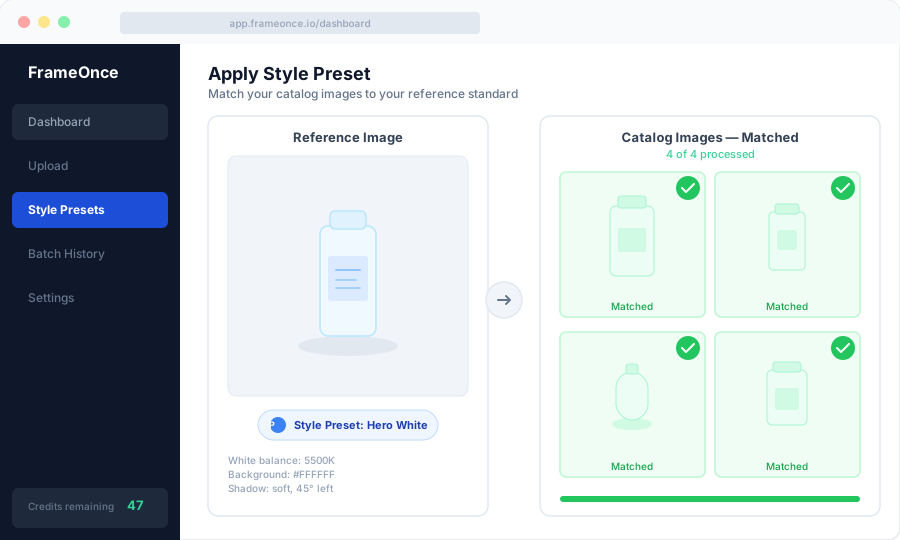
You take your best shirt photo — the one where the lighting, the styling, the background, and the color are exactly right — and save it as a Style Preset in FrameOnce.
From that point forward, every shirt image you upload gets automatically matched to that reference. FrameOnce adjusts the white balance, corrects the exposure, matches the shadow density, and calibrates the color tone — so shirt #247 looks like it was shot in the same session as shirt #1.
You can create different presets for different product lines: one for your white-background catalog shots, another for your lifestyle images, another for your seasonal lookbook.
The result is a shirt catalog that looks professionally cohesive — even if it was photographed across six months by different team members.
To draw the line clearly: FrameOnce enhances the shirts you actually photographed on real garments and real models. It does not generate fake apparel, AI models, or fabricated fits — buyers still see the exact shirt that will arrive in their box (see our Real Photos policy).
FrameOnce's free tools are live now. Run a free shop critique to see exactly where your catalog drifts, no signup needed. The full paid catalog workflow (Style Presets, batch processing, Etsy/Shopify integration) is in private testing and launches summer 2026; join the waitlist for double credits when paid plans are ready.
Frequently Asked Questions
What's the best method for photographing t-shirts?
Flat lay is the fastest and most consistent method for t-shirts. It shows the graphic clearly and is easy to reproduce across hundreds of SKUs.
Do I need an invisible mannequin?
For dress shirts, blazers, and structured garments, yes — the ghost mannequin effect is the industry standard and gives the most professional result. For casual tees and basic tops, flat lay works just as well.
How do I photograph white shirts on a white background?
Use separate lighting for the shirt and background. Light the shirt from the sides at 45 degrees, and use a dedicated background light to blow out the white. In post, the shirt's shadows and texture will separate it from the background.
How many photos do I need per shirt?
For eCommerce, aim for 4-6 images: front, back, one or two detail shots (collar, fabric, label), and optionally a lifestyle or on-model shot. Amazon requires a minimum of 1 image on white but rewards listings with 6+ images.
How do I keep colors consistent across my catalog?
Lock your white balance manually, use the same lights at the same power settings, and use a tool like FrameOnce to automatically match every image to your reference standard.
Summary
Photographing shirts well comes down to choosing the right method for your brand (flat lay, mannequin, or on-model), nailing your lighting setup, and building a repeatable process that produces consistent results.
The single biggest factor in a professional-looking shirt catalog isn't the camera or the lighting — it's consistency. Every shirt should look like it belongs in the same store, shot by the same photographer, in the same session.
For full lighting and setup instructions applicable to all product types, see our product photography setup guide. For the complete fabric-lighting deep dive — including side-vs-front lighting and color reflection control — see our product photography lighting guide. If you also photograph jewelry or accessories, our jewelry photography guide covers the specialized techniques for small, reflective pieces. For the gear recommendations behind every setup, see our product photography equipment guide.
Ready to make your entire shirt catalog look this consistent? Run a free shop critique to see exactly where your photos drift today — no signup needed. Or join the waitlist for double credits when the paid catalog workflow launches summer 2026.
FrameOnce Team
FrameOnce Team
Related Articles
Clothing Photography: How to Photograph Clothes for Your Online Store
How to photograph clothes for your online store: flat lay, mannequin, and on-model techniques with lighting, camera settings, and tips for catalog consistency.
Apparel Product Photography: How Fashion Brands Stay Consistent at Scale
How fashion brands photograph apparel at scale: lighting, shooting workflows, color accuracy, and keeping 500+ SKUs visually cohesive.
Catalog Photography: How to Keep 100+ Product Photos Looking Like One Cohesive Brand
Keep 100+ product photos looking cohesive: workflow, lighting standards, color management, and tools for ecommerce sellers at scale.
Stay Updated
Honest product photography tips delivered to your inbox. FrameOnce enhances the photos you take, real photos, never generated.