Amazon Product Photography Requirements: Complete 2026 Compliance Guide
Every Amazon product image rule in one place: white background specs, dimensions, file formats, and 2026 category-specific requirements.
Amazon rejects product listings every day for image violations. Wrong background color, product too small in the frame, text overlay on the main image, visible mannequin in an apparel shot — each one results in a suppressed listing that costs you sales until you fix it and resubmit.
The frustrating part: Amazon's official image guidelines are scattered across multiple help pages, vary by category, and change without announcement. This guide consolidates every requirement into one reference, current as of 2026, so you can photograph products that pass review on the first upload.
New to product photography? Start with our product photography setup guide for the workspace fundamentals, then come back here for Amazon-specific compliance.
Amazon Product Image Requirements: Official 2026 Specifications
Before diving into category-specific rules, these are the universal specs that apply to every Amazon listing regardless of what you sell. Main images carry the strictest compliance bar, but additional images, dimensions, and file formats are all governed by the same official framework — outlined section-by-section below.
Amazon Product Main Image Requirements: White Background Rules
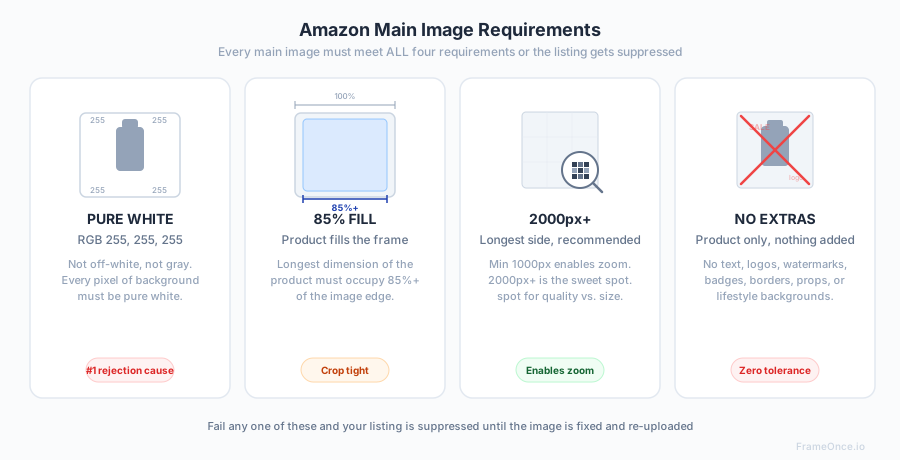
The main image — the one buyers see in search results and at the top of your listing — has the strictest requirements. Fail any of these and your listing gets suppressed.
Background
Pure white. RGB 255,255,255. Not off-white, not light gray, not cream. Amazon specifically checks for pure white and will reject images that fall short. This applies to the entire background area — corners, edges, and any space between product components.
Getting a truly pure white background requires either careful in-camera technique (separate background lighting) or post-production cleanup. Our white background photography guide covers both approaches in detail. The single biggest factor in achieving RGB 255,255,255 in-camera is your lighting setup for product photography — without a dedicated background light or sufficient distance between the product and backdrop, the background will consistently render grey regardless of post work.
Product Fill
The product must fill at least 85% of the image frame. Amazon wants buyers to see the product clearly, not a tiny item floating in whitespace. Measure this by looking at the longest dimension of the product relative to the image edge — it should occupy 85% or more of that dimension.
Image Dimensions
Minimum: 1000 pixels on the longest side. This enables Amazon's zoom functionality, which significantly impacts conversion rates. Products without zoom-eligible images convert at measurably lower rates.
Recommended: 2000 pixels or more on the longest side. Amazon themselves recommend 2000px+ for the best zoom experience. Going above 3000-4000px adds file size with diminishing returns, but 2000px should be your baseline, not your ceiling.
Aspect ratio: Amazon accepts any aspect ratio, but 1:1 (square) is the most common best practice. Square images display consistently across desktop, mobile, and app interfaces without letterboxing or pillarboxing, maximizing your visual real estate in search results.
File Format and Size
Accepted formats: JPEG (.jpg), TIFF (.tif), PNG (.png), GIF (.gif — non-animated)
Recommended: JPEG at 85-95% quality. This balances file size with image quality. TIFF files are unnecessarily large for web display. PNG is acceptable but produces larger files than JPEG for photographs.
Maximum file size: 10MB per image. Stay well under this — 1-3MB is the practical target for a high-quality JPEG at 2000px.
What's NOT Allowed on the Main Image
- No text, logos, watermarks, or badges of any kind
- No borders, color blocks, or inset images
- No props, accessories, or items not included in the purchase
- No mannequins visible in the frame (apparel category — ghost mannequin compositing required)
- No lifestyle settings, backgrounds, or environments
- No drawings, illustrations, or graphic representations in place of a real photograph
- No packaging shown unless the packaging IS the product
Amazon Additional Image Requirements
Amazon allows up to 9 images per listing (1 main + 8 additional). Additional images have more flexibility but still have rules.
What Additional Images Can Include
Lifestyle shots. Show the product in use, in context, in a real environment. These drive conversion by helping buyers visualize ownership.
Infographics. Images with text overlays highlighting features, dimensions, materials, or included components. These are the second-highest converting image type after the main product shot.
Scale reference. Show the product next to a common object or a human hand/body to communicate size. This reduces returns caused by size miscalculation.
Detail shots. Close-ups of texture, stitching, controls, ports, material quality — anything that answers a buyer's question before they ask it.
Multi-angle views. Front, back, side, top, bottom. More angles = more buyer confidence = fewer returns.
What Additional Images Still Can't Include
- No offensive or inappropriate content
- No competitor products or brand comparisons
- No pricing or promotional text ("Sale!", "30% off", etc.)
- No Amazon logos or any reference to Amazon itself
- No time-sensitive information ("New for 2026!")
Amazon Photography Requirements by Category
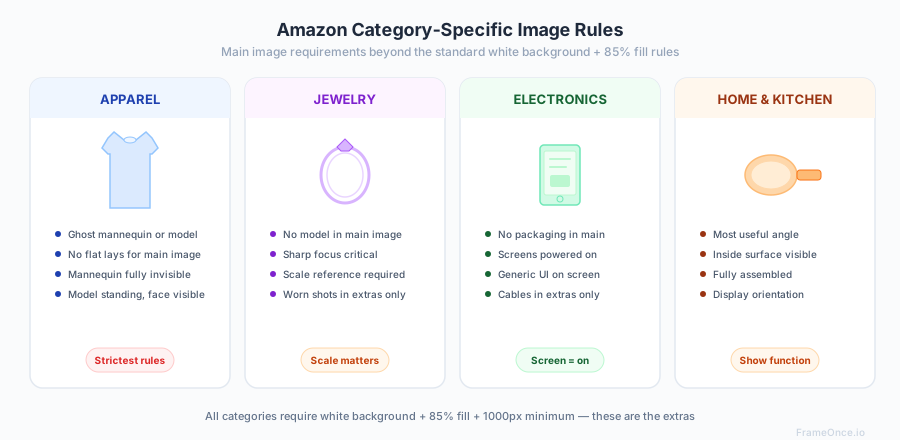
Amazon's universal rules apply everywhere, but each category layers on additional requirements that frequently trip up first-time sellers. Below is a category-by-category breakdown of the rules you actually need to follow — plus the enforcement patterns that matter in practice.
Amazon's image requirements are essentially a forced exercise in catalog consistency — uniform backgrounds, uniform product fill, uniform dimensions. The platforms that don't enforce these rules (Shopify, Etsy) leave sellers to enforce consistency themselves, which is harder than it sounds. Our product photo consistency guide covers why catalog-wide consistency drives conversions even on platforms that don't require it.
Amazon Clothing Image Requirements
Amazon apparel has the most additional rules of any category, and the enforcement is strict because apparel returns driven by mismatched imagery hurt Amazon's buyer-trust metrics.
Main image: For most clothing subcategories (tops, dresses, pants, outerwear), the main image must show the garment on a human model or using a ghost mannequin effect — flat lays are not acceptable. Some subcategories (accessories, socks, underwear) may allow flat lay main images. Check the specific style guide for your subcategory in Seller Central. The mannequin itself must be invisible — only the garment shape should be visible against the white background. Our clothing photography guide covers the ghost mannequin technique in detail.
Model requirements: If using a live model, the model must be in a natural standing pose (not sitting, lying down, or in unusual positions). Cropped/headless model shots and ghost mannequin images are widely accepted. The model should not be wearing accessories or other garments that are not part of the listing unless they're needed to demonstrate fit.
Swatch images: For parent listings with color variations, each color swatch requires its own main image showing the garment in that exact color. Swatch mismatches — where the swatch color on the listing page does not match the main image color — are a common rejection cause. Shoot swatches under the same lighting as the garment to ensure color fidelity across both.
Flat lay restriction for main images: Even when the garment is structured well on a flat surface, Amazon treats flat lay as non-compliant for main images in most apparel subcategories. Reserve flat lay for additional images or for categories where it's explicitly permitted. For apparel-specific catalog workflows, see our apparel photography guide.
Apparel
Beyond the main image rules, Amazon apparel listings require consistent sizing reference across the full image set. Include at least one image with a size reference (model height/size called out, or scale object) and one detail shot of fabric texture, stitching, or label. For variations like size-and-color parent listings, every child SKU should use identical framing and lighting — inconsistency between variations hurts listing quality scores.
Jewelry
Main image: Product must be the focal point, clearly visible, and in sharp focus. White background mandatory. For rings, necklaces, and bracelets, show the piece without a model in the main image. Additional images can show the jewelry worn.
Scale reference: Jewelry is small, and buyers frequently misjudge size from photos. Include at least one additional image showing the piece on a hand, wrist, neck, or next to a common reference object (coin, ruler segment). Listings without scale context see measurably higher return rates for "smaller than expected" reasons.
Zoom and detail shots: Jewelry listings benefit more from Amazon's zoom feature than any other category. Shoot at 3000px+ on the longest dimension and include tight macro shots showing gemstone clarity, metal finish, clasp mechanism, and setting detail. Our jewelry photography guide covers the macro lens, focus stacking, and reflection-control techniques that make these shots work.
Electronics
Main image: Product only, no packaging (unless you're selling the package as a bundle). Cables, chargers, and accessories that are included should be shown in additional images, not the main image.
Screen content rules: If the product has a screen, it's common practice to show a generic, non-branded interface rather than leaving it blank. A powered-off black screen often reads as "broken" to buyers; a branded UI can trigger IP flags. Use a clean generic interface (e.g., a solar system wallpaper for a tablet, a waveform for a monitor). This is a conversion best practice, not an Amazon formal rule — but Amazon does formally prohibit screens displaying competitor branding, trademarked content, or any text that could be mistaken for a claim about the product.
Accessories on the main image: Even if the accessories ship in the box, the main image must show only the primary product. Accessories belong in additional images with clear in-context framing (cables plugged in, charger shown next to the device).
Supplements and Consumables
Label visibility: The product label must be fully legible in the main image, including the brand name, product name, and net weight/volume. Amazon frequently rejects supplement listings where the label is angled, partially obscured, or too small to read.
Nutrition facts and supplement facts panels: At least one additional image must show the nutrition facts or supplement facts panel clearly, at a resolution where every line is readable. This is effectively mandatory — Amazon's consumable buyers filter heavily on ingredient lists, and listings without a readable facts panel underperform and often trigger additional compliance checks.
Expiration date and lot codes: Do not show printed expiration dates, lot codes, or batch numbers on any image. These change between production runs, which would force you to reshoot every image every time a new lot ships. Shoot the label face and crop out any variable data.
No unapproved claims: Claims like "FDA approved," "cures," "treats," or specific health outcomes are prohibited on images even if they appear on the physical packaging. If your actual label has these phrases, photograph around them or retouch them out for the listing images.
Home Goods
Main image: Product shown at its most useful angle in its fully assembled, display-ready state. For cookware, the inside surface should be visible. For furniture, show the fully assembled item — disassembled/flat-pack shots are not acceptable as main images. For décor, show it in its intended display orientation.
In-use context in secondary images: Home goods convert significantly better when secondary images show the product in a real room or in-use context — a sofa in a styled living room, cookware on an active stovetop, bedding on a made bed. These lifestyle shots are Amazon-compliant as additional images and reduce returns by setting accurate size and aesthetic expectations.
Scale in rooms: For furniture and large home items, include at least one image with a human or common reference object (coffee cup on a side table, person next to a bookshelf) so buyers can gauge real-world size.
How to Photograph Products for Amazon: Step by Step
Equipment You Need
At minimum: a camera (phone works for most categories), two softbox lights, a tripod, and a white background. The two-light setup we recommend — key light at 45 degrees, fill light opposite at 50–70% power — handles the overwhelming majority of Amazon-compliant catalog shots. For a complete gear list with specific recommendations at every price point, see our product photography equipment guide.
For Amazon specifically, you also need:
A color checker or gray card — Amazon's white background requirement means your color accuracy needs to be verifiable. A gray card ($8-$15) ensures your white balance is calibrated to produce true white, not warm-white or cool-white.
Photo editing software — Even with perfect lighting, you'll need to push backgrounds to pure RGB 255,255,255 in post-production. Lightroom, Photoshop, or free alternatives like GIMP all work.
The Amazon Photography Workflow
1. Set up your lighting for white backgrounds. Two softboxes on the product, background lit separately (or product lights angled to spill onto the background). The background should be 1-1.5 stops brighter than the product. Full setup in our lighting guide.
2. Calibrate white balance. Gray card in front of the product, custom white balance set, gray card removed. Do this at the start of every session and after any lighting change.
3. Shoot the main image first. This is the most important image — it determines your click-through rate in search results. Center the product, fill 85%+ of the frame, check sharpness at 100% zoom.
4. Shoot additional angles. Work through your shot list: back, sides, details, lifestyle. Keep lighting locked for all catalog-style shots. Change setup only for lifestyle/contextual images.
5. Post-production: push background to white. Open in your editor, use Curves or Levels to push the background to 255,255,255. Check corners and edges — uneven lighting creates gray patches that Amazon's automated check will flag. Mask the product if needed to prevent background adjustments from blowing out product detail.
6. Check Amazon compliance before uploading. Open the final image and verify: Is the background pure white? Does the product fill 85%+ of the frame? Is the longest dimension at least 1000px? Is there any text, logo, or watermark? Are there any props not included in the purchase?
Common Amazon Image Rejection Reasons
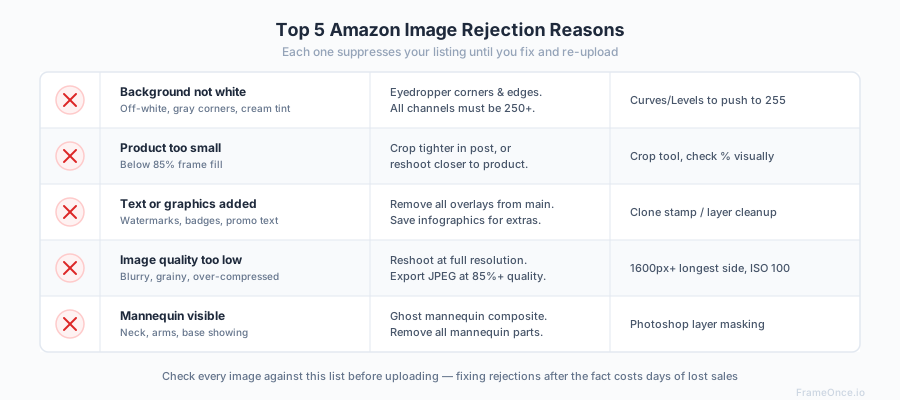
"Image does not have a pure white background." The most common rejection. Solution: verify RGB values in the corners and edges of your image. Any value below 250 in any channel risks rejection. Use the eyedropper tool in your editor to spot-check.
"Product does not fill enough of the image frame." Your product is too small relative to the image dimensions. Solution: crop tighter or reshoot closer.
"Main image contains text or graphics." Even your brand logo on the product itself is technically fine — but adding watermarks, size labels, or promotional text is not. The product as it ships is what should appear; nothing should be digitally added.
"Image quality is too low." Blurry, grainy, or compressed images. Solution: shoot at full resolution, export at 85%+ JPEG quality, ensure your image is at least 2000px on the longest side.
"Mannequin is visible." For apparel, the mannequin must be completely removed in post-production. Any visible mannequin parts (neck, arms, base) will cause rejection.
Maintaining Amazon Image Consistency Across Large Catalogs
If you sell 10 products on Amazon, manual image compliance is straightforward. If you sell 200+, consistency becomes the real challenge. Each product needs the same background whiteness, the same framing, the same color accuracy — and Amazon's automated systems will flag listings where images look noticeably different from one another.
The consistency problem compounds when you photograph products across multiple sessions, different seasons, or different lighting conditions. Your January batch looks slightly different from your March batch, and your catalog starts to look fragmented.
Solutions:
Document everything. Light positions, camera settings, distances, background material. Recreate the identical setup for every session. Our product photography setup guide covers how to build a repeatable system.
Batch edit with presets. Apply the same Lightroom preset to every image within a session. Adjust the preset between sessions to account for any drift.
Use automated consistency tools. For catalogs above 50 SKUs, manual matching becomes impractical. FrameOnce solves this by letting you define a visual standard from one perfect image and applying it across your entire catalog — ensuring every product looks like it was shot in the same session, every time. Important on Amazon specifically: FrameOnce enhances the photos you took of your real inventory rather than generating product imagery, which keeps your listings on the right side of Amazon's rules around accurate representation (read our Real Photos policy).
Amazon Product Photography FAQs
What are Amazon's main image requirements for white backgrounds?
The main image background must be pure white — RGB 255,255,255 — across the entire frame, including corners and any space between product components. Off-white, light grey, or cream tones will get the listing suppressed. Achieving this reliably requires either a dedicated background light during the shoot or targeted background correction in post-production. The product itself must also fill at least 85% of the longest dimension of the frame.
What size should Amazon product images be in 2026?
Amazon's minimum is 1000 pixels on the longest side, which unlocks the zoom feature that meaningfully impacts conversion. Amazon themselves recommend 2000 pixels or more for the best zoom experience. The practical sweet spot is 2000–3000 pixels — enough resolution for sharp zoom without bloating file size beyond the 10MB per-image cap. Square (1:1) aspect ratio displays most consistently across desktop, mobile, and the Amazon app.
Does Amazon require pure white backgrounds for all product images?
No — only the main image. The main image (the one shown in search results and at the top of the listing) must have a pure white RGB 255,255,255 background with no props, text, or context. Additional images allow lifestyle environments, infographics with text overlays, scale references, multi-angle views, and detail shots. You're given up to 8 additional images per listing, and using them well is one of the highest-leverage conversion improvements available.
Can I use lifestyle photos as my Amazon main image?
No. The main image must show only the product against a pure white background — no environmental context, no models in scenes, no styled settings, no props that aren't part of the purchase. Lifestyle photography is allowed and encouraged as additional images, where it drives conversion by helping buyers visualize ownership. Reserve your strongest lifestyle shots for image slots 2 through 9.
What file formats does Amazon accept for product images?
Amazon accepts JPEG (.jpg), TIFF (.tif), PNG (.png), and non-animated GIF (.gif). The recommended format for nearly all use cases is JPEG saved at 85–95% quality, which balances visual fidelity against file size. TIFF files are unnecessarily large for web delivery and PNG produces larger files than JPEG for photographic content. Maximum file size is 10MB per image, but a high-quality 2000px JPEG will typically land between 1MB and 3MB.
How much of the frame should my product fill on Amazon?
The product must fill at least 85% of the image frame on its longest dimension. This is one of the most common rejection reasons after background non-compliance: a product that occupies only 60–70% of the frame reads as a "tiny item floating in whitespace" and gets flagged. Crop tighter or reshoot closer if your product is small relative to the frame. The 85% rule applies to the main image; additional images have more flexibility.
What to Do Next
Bookmark this page for reference when uploading new products. Amazon's requirements don't change often, but when they do, they usually tighten rather than loosen — so staying ahead of compliance saves you listing suppression headaches later.
For the photography fundamentals behind Amazon-compliant images, explore our guides:
- Product photography setup — build the workspace
- Product photography lighting — nail the lighting
- White background photography — get pure white backgrounds
- Product photography equipment — gear at every budget
- Clothing photography — apparel-specific techniques
- Apparel photography at scale — catalog consistency for fashion brands
- Product photography pricing — understand what professional photography costs
And when your catalog grows beyond what manual compliance checking can handle, FrameOnce ensures every image in your catalog meets the same visual standard — automatically.
FrameOnce Team
FrameOnce Team
Related Articles
White Background Product Photography: The Complete Guide for E-Commerce
How to shoot white background product photos for Amazon, Etsy, and Shopify: setup, lighting, and editing for a perfectly consistent product catalog.
Product Photo Consistency: The Catalog Killer Most Sellers Ignore
Inconsistent product photos quietly kill conversions. Why catalog consistency matters and how to achieve it across hundreds of products at scale.
Catalog Photography: How to Keep 100+ Product Photos Looking Like One Cohesive Brand
Keep 100+ product photos looking cohesive: workflow, lighting standards, color management, and tools for ecommerce sellers at scale.
Stay Updated
Honest product photography tips delivered to your inbox. FrameOnce enhances the photos you take, real photos, never generated.