Product Photography Setup: Complete Guide for 2026
Product photography setup guide: lighting, camera settings, backgrounds, and a repeatable studio process for consistent ecommerce catalog photos.
You spent an hour getting your lighting perfect. Your hero product looks incredible. Then you photograph the next SKU — and it looks completely different.
Wrong shadows. Different color tone. A background that's slightly off-white instead of pure white.
That's the real problem with product photography setups: getting one great shot is hard enough. Getting every product to look consistent across a catalog of 50, 500, or 5,000 items is a different challenge entirely.
This guide covers everything you need for a solid product photography setup — the gear, the settings, the background, the lighting — and then shows you how to stop re-creating the wheel every time you photograph a new product. If you're deciding between building your own setup or outsourcing, our product photography pricing guide has a detailed cost comparison to help you choose.
What You Actually Need (vs. What You Don't)
Before spending money, let's be clear about what actually matters for eCommerce product photography.
You need:
- A camera (your phone is fine to start)
- Consistent lighting
- A clean background
- A stable surface or tripod
- A way to keep your setup repeatable
For a full breakdown of every piece of equipment at every budget tier, see our product photography equipment guide.
You don't need:
- A $3,000 DSLR camera
- A professional photo studio
- Expensive props or backdrops
- Years of photography training
Most sellers over-invest in gear and under-invest in consistency. A $300 mirrorless camera with locked-down settings will outperform a $3,000 setup where you're eyeballing the lighting every session.
Step 1: Choose Your Camera
For most eCommerce sellers, you have three realistic options:
Smartphone (iPhone 14+ or Pixel 7+)
Best for: beginners, small catalogs, quick listings.
The cameras in modern flagship phones are genuinely excellent for product photography when used correctly. Set your phone to shoot in RAW or the highest quality JPEG available, lock your exposure manually, and use a tripod. For iPhone and Android-specific settings (Halide, Pro mode, manual ISO and white balance), see our smartphone product photography guide.
Mirrorless or DSLR (entry-level, $400–$800)
Best for: growing stores, anyone selling on Amazon or building a brand.
The Sony a6000 series, Canon EOS R50/R100, and Fujifilm X-T line are popular choices. The main advantage isn't image quality — it's control. You can lock every setting and get identical results every time.
Point-and-Shoot
Best for: tabletop product photography with predictable subjects.
Less common now but still viable for small objects like jewelry, cosmetics, or watches.
The honest truth: your camera matters less than your lighting and your consistency. Don't upgrade your camera until you've mastered your setup.
Step 2: Set Up Your Lighting
Lighting is the single most important element of your product photography setup. Get this right and everything else becomes easier.
Option A: Natural Light (Free)
Natural light from a large north-facing window gives clean, soft, diffused light — ideal for cosmetics, food, and lifestyle products.
How to use it correctly:
- Shoot within two hours of golden hour (early morning or late afternoon)
- Never shoot in direct sunlight — it creates harsh shadows
- Use a white foam board or reflector on the opposite side to fill in shadows
- Shoot at the same time of day, every time, to keep results consistent
The problem: natural light changes. Cloud cover, seasons, and time of day mean your photos on Monday look different from Tuesday. For catalogs, this is a real consistency problem.
Option B: Continuous LED Lights (Recommended, $80–$300)
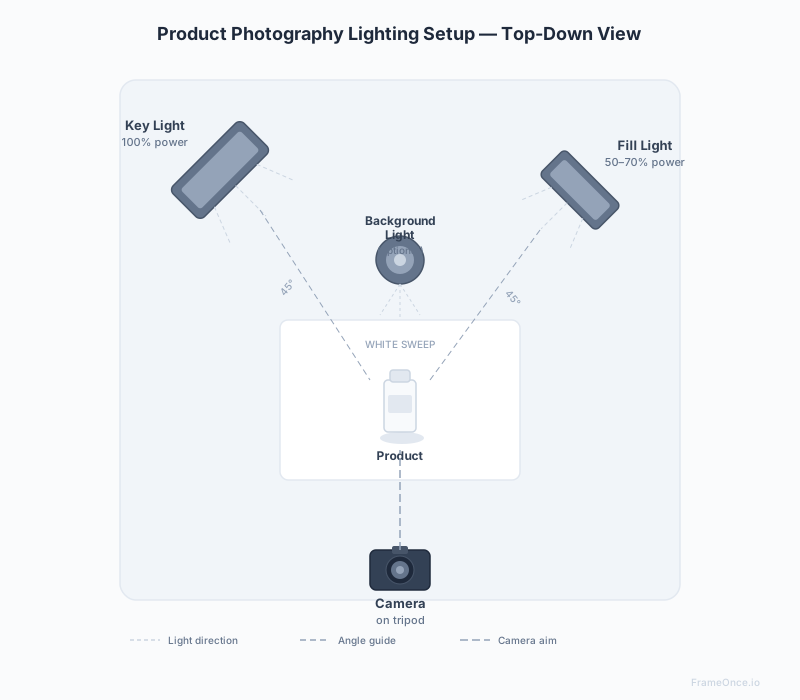
Two softbox LED lights positioned in a classic two-point or three-point lighting setup is the go-to for most eCommerce sellers.
Basic two-light setup:
- Key light: 45 degrees to the left of your product, slightly above
- Fill light: 45 degrees to the right, at product level, at 50–70% brightness of the key light
- Background light (optional): positioned behind to eliminate background shadows
Look for lights with a high CRI (Color Rendering Index) of 90 or higher — 95+ is ideal for color-sensitive products like fashion and cosmetics. This ensures your product colors render accurately, critical for anything where color trust matters.
Recommended approach: once you find a position that works, tape marks on the floor or table to remember exactly where each light goes. This is your first step toward repeatable results.
For the complete lighting deep-dive — full setup diagrams, category-specific approaches, and camera settings — see our product photography lighting guide.
Option C: Lightbox / Light Tent ($30–$150)
A lightbox is a collapsible cube with diffusion panels that creates soft, even light from all sides. It works well for small products like jewelry, watches, cosmetics, and electronics.
Best for: small objects under 12 inches, pure white background shots, sellers who want a fast consistent setup without adjusting lights every session.
Limitation: the enclosed space limits creative angles. Everything looks similar — which is actually great for catalog consistency, but limiting for lifestyle shots.
Step 3: Choose Your Background
For most eCommerce platforms, white is the standard — and for good reason. Amazon requires pure white (#FFFFFF) backgrounds for main product images — see our Amazon product photography requirements guide for the full compliance checklist. Shopify stores convert better with consistent, distraction-free backgrounds.
Your background options:
White sweep paper or cardstock
Clean, professional, inexpensive. A roll of white seamless paper or a large sheet of matte white cardstock eliminates wrinkles and reflections. Replace it when it gets dirty.
White foam board
Available at any dollar store for under $2. Excellent for tabletop setups. Position it as a sweep (curved up behind your product) for a seamless background.
Fabric backdrop
Better for larger products or lifestyle shots. Wrinkle-prone — iron or steam before shooting.
Digital background removal
Many sellers shoot on any clean surface, then remove the background in post-processing. This works well when combined with a consistent lighting setup.
Pro tip: whatever background you choose, the color of your background in the final image matters more than what it physically is. A slightly warm white background on some products and a cool white on others will make your catalog look inconsistent — even if both were shot on the same white cardstock.
Camera Settings for Product Photography
This is where most sellers lose consistency — they let the camera make automatic decisions, and those decisions change from shot to shot.
Here are the settings to lock manually:
White Balance: Set to a fixed Kelvin value (5500K for daylight-balanced LEDs, 3200K for tungsten). Never use Auto White Balance for product photography — it shifts between shots.
ISO: Keep as low as possible (ISO 100–200) to minimize grain. If your images are too dark, add more light rather than raising ISO.
Aperture: f/8–f/11 for most products (gives you sharpness throughout the product). Go lower (f/2.8–f/4) for selective focus or jewelry macro shots.
Shutter Speed: Use a tripod and set shutter speed to whatever gives you a correct exposure at your chosen ISO and aperture. Consistency matters more than speed.
Focus: Use manual focus or focus lock once you've set your product position. Don't let the camera refocus between shots.
Write these settings down and keep them with your photography setup. Every session should start by entering the exact same numbers.
Step 5: Create a Repeatable Setup
This is the step that separates amateur product photography from professional catalog work.
After every element above is working — your lighting is good, your background is clean, your settings are locked — document everything:
- Light positions: tape marks on the floor, take a photo of your setup from above
- Camera distance: use a tape measure and record it
- Camera height: mark your tripod position
- Settings: write them on a card and tape it to your tripod
- Product positioning: photograph how the product sits in the frame
This documentation is your style preset — a written record of exactly how to recreate your perfect shot every time.
The goal is that any product you photograph in this setup should match any other product photographed in this setup. Same lighting angle. Same shadows. Same white balance. Same feel.
Small Product Photography Setup: Jewelry, Cosmetics, and Accessories
For products under 12 inches, a compact setup outperforms a full studio in both cost and consistency. Here's what works:
The lightbox approach: A collapsible lightbox ($30–$150) with built-in diffusion panels creates even, reflection-free light from all sides automatically. Set it on a tabletop, position your camera on a tripod at the opening, and the setup recreates itself identically every session. Ideal for jewelry, cosmetics, watches, and small packaged goods.
Tabletop two-light setup: Two LED panels on compact stands, positioned 45 degrees to either side of a white sweep board. Footprint: 3 feet × 3 feet. This is the minimum professional setup for small ecommerce products.
Key advantages of a small setup:
- Total gear cost: $150–$500 (camera not included)
- Setup time once documented: 10–15 minutes
- Consistent results session after session
- No studio rental required
For jewelry specifically, a macro lens is essential — a standard kit lens cannot capture gemstone detail. See our jewelry photography guide for the full small-product lighting and lens approach.
The Consistency Problem: When Your Setup Isn't Enough
Even with a perfectly documented setup, you'll hit consistency problems:
- Time between sessions — lights shift position, settings drift, backgrounds get replaced
- Multiple product lines — your hero product shots have different requirements than your lifestyle shots
- Scale — re-photographing 500 products is enormously time-consuming
- Editing variation — if multiple people are editing photos, they'll make different decisions
This is where a physical photography setup has real limitations. The setup creates the raw material — but making your entire catalog look cohesive requires something more.
How FrameOnce Solves the Catalog Consistency Problem
A consistent photography setup is the foundation. FrameOnce is what you build on top of it.
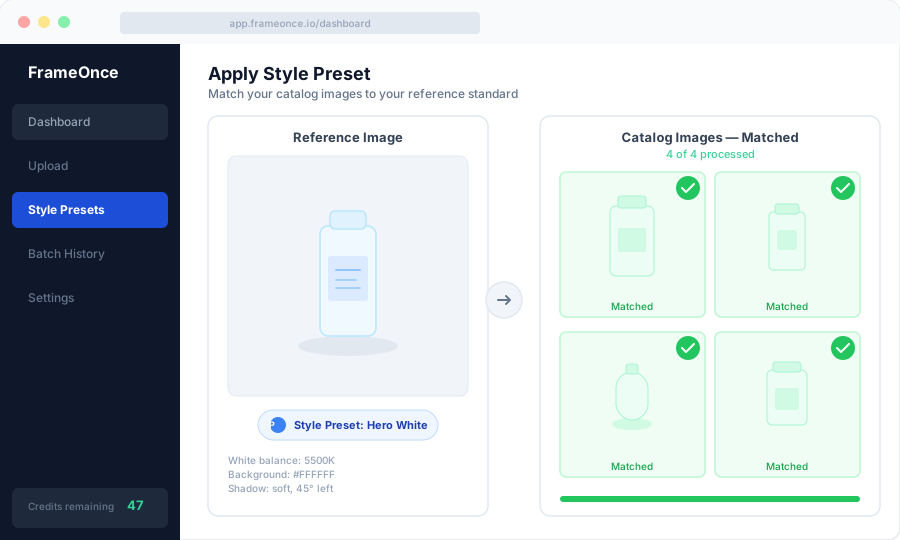
Here's how it works: you take your best product photo — the one where your setup is perfect and the result is exactly what your brand should look like. You upload it to FrameOnce as a Style Preset.
From that point on, every other product image you upload gets automatically matched to that reference. FrameOnce corrects the lighting, adjusts the white balance, matches shadows, and calibrates the color — so the 47th product you photograph looks exactly like the 1st.
You can create different presets for different product lines — one standard for your hero white-background shots, another for lifestyle images, another for your seasonal collection.
The result: a catalog that looks like it was shot in one session by one professional photographer — even if it was shot across six months by three different people.
The line we draw: FrameOnce enhances the photographs you took on your real setup. It does not generate fake products, AI models, or fabricated scenes — your photo is still the source of truth, just made consistent across the catalog (see our Real Photos policy).
FrameOnce's free tools are live now. Run a free shop critique to see exactly where your catalog drifts, no signup needed. The full paid catalog workflow (Style Presets, batch processing, Etsy/Shopify integration) is in private testing and launches summer 2026; join the waitlist for double credits when paid plans are ready.
Your Product Photography Setup Checklist
Gear
- Camera charged and memory card cleared
- Tripod positioned at marked height and distance
- Lights positioned at taped floor marks
- Background clean (replace if marked or yellowed)
Settings
- White balance set to fixed Kelvin value
- ISO set to 100–200
- Aperture set to f/8–f/11
- Manual focus locked at product distance
Before Shooting
- Take a test shot and compare to your reference image
- Check shadows match your standard
- Check background color matches pure white or your brand standard
- Adjust if anything looks different
After Shooting
- Edit consistently (same software, same preset)
- Compare final image side-by-side with previous products
- Update your setup documentation if anything changed
Frequently Asked Questions
Do I need a professional studio for product photography?
No. Most eCommerce brands start with a simple home setup — two LED softboxes, a white background, and a tripod. What matters is consistency, not location.
What's the best camera for product photography?
The one you already own. Start with your smartphone and a tripod. Upgrade to a mirrorless camera when you've outgrown what your phone can do — not before.
How do I get white backgrounds without editing?
Use a white sweep paper background and two lights positioned to eliminate shadows behind the product. A lightbox achieves the same result automatically for small objects.
How do I keep my product photos consistent across a large catalog?
Document your setup precisely and use a tool like FrameOnce to automatically match new images to your established standard.
How long does a product photography setup take?
Initial setup: 2–4 hours. Once documented, recreating the same setup: 15–20 minutes.
Summary
A great product photography setup comes down to five things: the right camera for your needs, consistent lighting, a clean background, locked camera settings, and a documented process you can recreate every time.
The photography setup gets you consistency within a session. Getting consistency across your entire catalog — across months and thousands of products — is where tools like FrameOnce come in.
For a broader ecommerce photography foundation, read our complete product photography guide. For apparel-specific techniques, see how to photograph shirts and clothing or the full clothing photography guide covering flat lay, ghost mannequin, and on-model methods.
Ready to make your whole catalog look this consistent? Run a free shop critique to see exactly where your photos drift today — no signup needed. Or join the waitlist for double credits when the paid catalog workflow launches summer 2026.
FrameOnce Team
FrameOnce Team
Related Articles
The Complete Product Photography Guide for eCommerce
The complete beginner's product photography guide for ecommerce: setup, lighting, product types, platform specs, pricing, and catalog consistency tips for 2026.
Product Photography Equipment: What You Actually Need (and What You Don't)
The complete product photography equipment list by budget tier: from $50 phone setups to full studio rigs, with what's worth buying and what to skip.
Product Photography Lighting: A Complete Guide to Consistent Results
Product photography lighting guide: natural vs. artificial setups, camera settings, softbox positions, and consistency techniques for ecommerce catalogs.
Stay Updated
Honest product photography tips delivered to your inbox. FrameOnce enhances the photos you take, real photos, never generated.