Product Photography Lighting: A Complete Guide to Consistent Results
Product photography lighting guide: natural vs. artificial setups, camera settings, softbox positions, and consistency techniques for ecommerce catalogs.
Lighting is the single variable that separates catalog-quality product images from amateur ones — more than the camera body, more than the background, more than post-processing. Get it right and your products look professional regardless of your camera. Get it wrong and no amount of editing will fix it.
This guide covers every aspect of product photography lighting: the difference between natural and artificial light, how to set up a two-light and three-light rig, camera settings that work with your lighting, lighting approaches for specific product categories, and how to maintain consistency across hundreds of shots in a catalog.
Lightbox vs Natural Light vs Artificial Lighting: Which Is Better for Product Photography?
The choice between natural light, artificial lighting, and a lightbox isn't about quality — it's about control, consistency, and the size of what you're shooting.
A lightbox (also called a light tent) is a collapsible fabric cube with built-in or external LEDs that diffuse light evenly from multiple sides. It sits between natural light and a full softbox rig as a budget middle-ground: typically $40–$120, near-zero learning curve, and capable of producing clean white-background results out of the box. Lightboxes work best for products under 12–20 inches on the longest dimension — jewelry, cosmetics, accessories, small electronics, packaged goods. The trade-off is size limit and visual character: anything larger won't fit, and the all-around diffusion that makes lightboxes idiot-proof can also flatten texture and dimensionality on products where shadow detail matters. For shoots beyond a lightbox's size envelope, or when you need shaped lighting for texture and depth, natural window light or a softbox setup gives you more control.
Natural Light
Strengths: Free. Produces soft, flattering light that works well for food, lifestyle products, cosmetics, and apparel. The color rendering (CRI) of natural daylight is essentially perfect.
Setup: Position your product next to a large window — north-facing in the northern hemisphere gives you consistent light that doesn't change as the sun moves. Use a white foam board reflector on the opposite side to fill shadows.
When to use it:
- Lifestyle and editorial photography
- Social media content
- Products where "artisanal" or "natural" associations benefit the brand
The consistency problem with natural light: Cloud cover, time of day, season, and local weather mean that your photos on Monday look different from your photos on Friday. For a 10-product catalog, this variation is manageable in post. For a 200-product catalog built over six months, it creates compounding inconsistency that makes your store look like products were sourced from different sellers.
For catalog work — especially at scale — natural light creates problems that artificial lighting solves.
Continuous LED Lights
Strengths: Fully controllable. What you see is what you get. Can be precisely reproduced every session. Adjustable color temperature and brightness allow you to fine-tune your setup once and lock it in.
The best setup for ecommerce product photography: two LED softboxes, positioned in a standard two-light arrangement (detailed below). This setup costs $80–$300 and handles the vast majority of product categories effectively.
When continuous LEDs are the right choice:
- Any white background catalog work
- Any situation where you need consistency across sessions
- Video content alongside photography (same lights work for both)
- Beginners who want to see exactly what the final image will look like before pressing the shutter
Strobe/Flash Lighting
Strengths: More powerful than continuous LEDs. Freezes motion. Used in high-end commercial photography.
Why most ecommerce sellers should avoid it: Strobes require metering to set exposure — you can't see the final light balance until you shoot a test frame. This adds friction for beginners and slows down catalog work. Continuous LEDs are more practical for the overwhelming majority of product photography use cases.
Best Lighting for Ecommerce Product Photos: The Two-Light Setup
A two-light setup handles most product categories effectively and is the recommended starting point for any seller building a home studio.
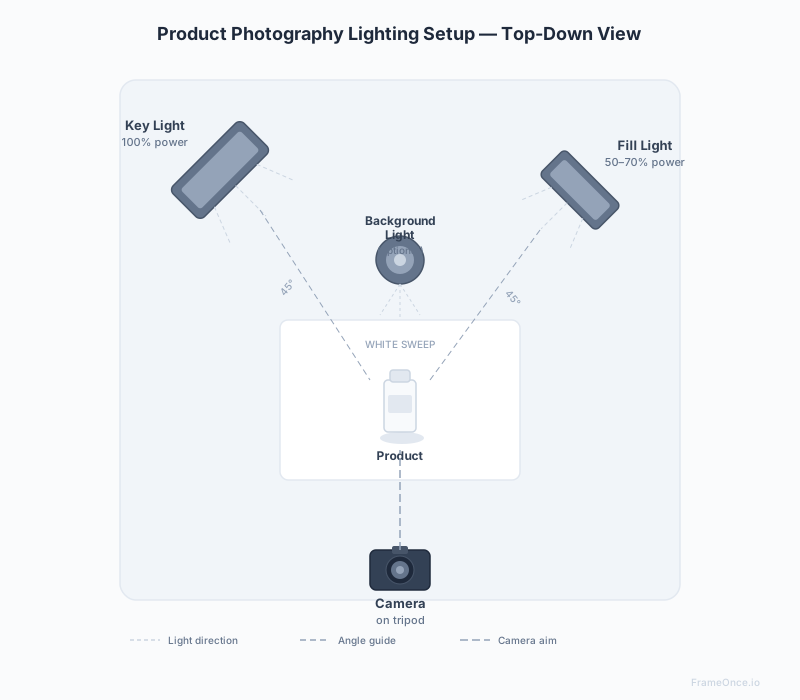
Light Positions
Key light: Your primary light source. Position at 45 degrees to the left of the product (or right — pick one and be consistent), slightly above product height. The key light creates the primary shadows that give your product dimension.
Fill light: The secondary source. Position at 45 degrees on the opposite side from the key light, at product height, at 50–70% of the key light's brightness. The fill light opens up the shadow side without eliminating the dimension created by the key light.
The ratio: A 2:1 ratio (key light twice as bright as fill light) is the standard starting point for most product categories. For products where shadow dimension is important (textured surfaces, 3D objects), use a higher ratio (3:1 or 4:1). For flat, even product shots, lower ratios work better.
How to Position Lights Without a Light Meter
If you're working with continuous LEDs and don't have a light meter:
- Set your camera to manual mode with your target settings (ISO 100, f/8, and a shutter speed around 1/60–1/100 on a tripod)
- Turn on only the key light and adjust its brightness until the product is correctly exposed
- Turn on the fill light at 50% of the key light's power
- Review and adjust the fill until shadows open up without flattening the image completely
- Note the exact power settings for both lights — write them down
This gives you a baseline you can recreate exactly in every subsequent session.
Common Two-Light Mistakes
Lights too close to the product. The closer a light source is to the product, the harsher and more directional the light becomes. For soft, even product lighting, keep lights 3–5 feet away. Use a larger softbox or diffusion panel to further soften the light.
Lights at the same height. Identical light positions produce flat, dimensionless images. The key light should be above product height; the fill should be at or slightly below.
No control over background tone. If your background appears grey rather than white in your images, you need to add light to the background (a third light aimed at the background, or move the background further from your lights and the product closer to them).
Adding a Third Light: Background and Accent Lighting
A two-light setup is the floor — a three-light setup gives you more control over the final image, particularly for white background compliance and product separation.
Background Light
A third light aimed directly at your white background produces the clean, bright white required for Amazon main images and professional catalog photography. Without it, your background will appear off-white or grey, particularly if your product is close to the background or your key/fill lights are relatively dim.
Setup: Position a third LED panel behind the product, aimed at the background. Start at the same brightness as your fill light and adjust until the background reads as pure white in your histogram without blowing out the product itself.
Accent/Rim Light
An accent light positioned behind the product at a low angle creates a subtle rim of light that separates the product from the background. This is particularly effective for:
- Products that are similar in tone to the background (white products on white background)
- Textured products where edge definition matters
- Dark products where background separation is difficult
For product photography, rim lights are often positioned below and behind, aimed upward at the back of the product.
Most Common Lighting Setups for Ecommerce Product Photography
Five lighting setups cover the overwhelming majority of ecommerce product photography. This is a quick-reference overview — the deeper mechanics for each are covered in the sections above and below.
Two-light softbox setup. The standard for ecommerce. Key light at 45 degrees on one side, fill light at 45 degrees on the opposite side at 50–70% power, both diffused through softboxes. Handles apparel, electronics, packaged goods, and most general catalog work. Cost: $80–$200. This is the default starting point unless your product category has a specific reason to deviate.
Three-light setup. Two-light setup plus a dedicated background light aimed at the backdrop. Required when you need a true RGB 255,255,255 white background — Amazon main images, premium catalog work, anything where the background can't read as off-white or grey. Adds about $40–$100 to the two-light cost.
Single softbox plus reflector. The budget option. One softbox positioned 45 degrees off-axis as the key light, paired with a white foam-core reflector on the opposite side bouncing light back into the shadows. Costs under $60 total and produces respectable results for non-reflective products. Best for sellers under 25 SKUs who don't need scaled consistency yet.
Ring light. A circular LED that surrounds the lens. Best for flat lay overhead shots — apparel laid flat, jewelry on a surface, cosmetics from above — where you want shadow-free, even illumination. Not recommended as a primary light for three-quarter product views: the front-on light angle flattens dimension.
Natural window light. Free, soft, and excellent for lifestyle, food, cosmetics, and apparel content. Position the product next to a large north-facing window with a white reflector opposite. Use it when you don't need session-to-session consistency or when an artisanal aesthetic is part of the brand. Avoid it for catalog work spanning weeks or months — sun position, weather, and season will shift your results in ways that compound across the catalog.
Camera Settings for Product Photography Lighting
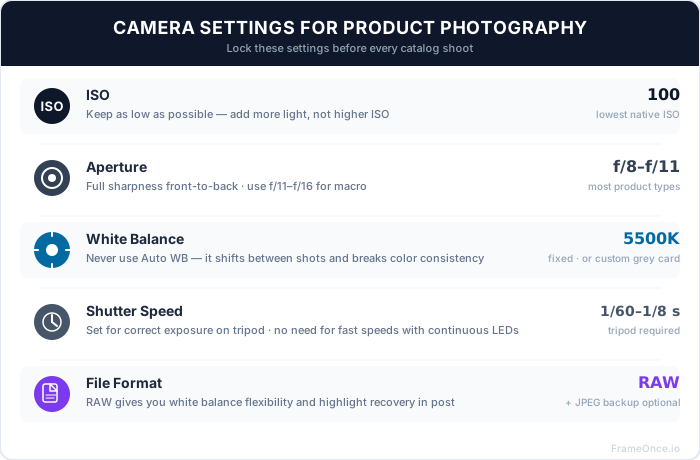
The right camera settings depend on your lighting setup. Here are the settings to lock for consistent catalog results.
The Core Settings
White balance: Set a fixed Kelvin value matched to your lights, or set a custom white balance using a grey card photographed under your actual lights. Do not use Auto White Balance. Auto WB recalibrates between shots, creating color inconsistency that's difficult to batch-correct in post.
- Daylight-balanced LEDs: 5500K
- Tungsten-balanced LEDs: 3200K
- Mixed lighting: measure with a grey card and set a custom white balance
ISO: As low as possible — ISO 100 or the lowest native ISO your camera allows. Higher ISO introduces noise into fine product detail. If your images are too dark at ISO 100, add more light rather than raising ISO.
Aperture: f/8–f/11 for most products. This range produces sharpness throughout the entire product (including edges and corners) without diffraction softness. Go wider (f/4–f/5.6) for selective focus or lifestyle shots where some background blur is intentional. For macro photography (jewelry, cosmetics detail), f/11–f/16 with focus stacking.
Shutter speed: With a tripod, shutter speed is whatever correctly exposes the image at your chosen ISO and aperture. For continuous LED lighting, shutter speed doesn't cause banding (unlike some strobes). Typical range: 1/60–1/8 second on a tripod.
File format: Shoot RAW for maximum latitude in post, particularly for white balance adjustment and highlight recovery on reflective surfaces.
Quick Reference by Product Category
| Category | ISO | Aperture | White Balance |
|---|---|---|---|
| Apparel (flat lay) | 100–200 | f/8–f/11 | 5500K fixed |
| Apparel (mannequin) | 100 | f/8–f/11 | 5500K fixed |
| Jewelry | 100 | f/11–f/16 | Custom grey card |
| Electronics | 100 | f/8–f/11 | 5500K fixed |
| Cosmetics | 100–200 | f/8 | Custom grey card |
| Glassware | 100 | f/11 | 5500K fixed |
| Large products | 100–400 | f/8 | 5500K fixed |
Lighting for Specific Product Categories
Different product types have different lighting challenges. Here's how to address the most common ones.
Clothing and Apparel
Fabric is reflective and textured. The two key principles:
Soft light is essential. Hard, direct light creates harsh shadows in fabric folds and makes wrinkles appear worse. Always diffuse your light through softboxes, umbrellas, or window diffusion panels.
Light angle controls texture visibility. Side lighting (key light positioned 90 degrees to the side rather than 45) creates micro-shadows in fabric texture that show weave and surface character. Front lighting flattens texture and produces clean, smooth-looking fabric. Choose based on whether texture is a selling point.
For detailed clothing photography techniques, see our clothing photography guide.
Jewelry and Reflective Metals
Jewelry is the most technically demanding category for lighting. The goal is diffused light that reveals metal quality without creating distracting reflections.
The lightbox approach: A collapsible light tent ($50–$100) provides automatically diffused, even light from all sides. This is the recommended starting point for jewelry — it eliminates most reflections without requiring advanced lighting knowledge.
The softbox approach: Two large softboxes with diffusion panels, positioned above and to both sides of the piece. Add a white foam core reflector beneath to fill the shadow under the piece. For gold and polished silver, a polarizing filter on the lens combined with polarizing gels on the lights (cross-polarization) eliminates nearly all specular surface reflections.
Accent sparkle: Diffused light maintains base sharpness but reduces gemstone sparkle. Add a small, tightly focused LED pen light or LED panel aimed at the stone from a 45-degree angle to create the internal light refraction that makes diamonds appear to glow.
Glassware and Transparent Products
Glassware requires backlighting to show the transparency and shape effectively.
Edge lighting technique: Position a light directly behind the product (between the product and background), slightly below it, aimed upward. This creates a bright gradient in the background that makes the glass edges visible. Adjust the background light brightness until the glass reads as transparent but distinct.
White background vs. dark background: Glassware on pure white often looks like a cutout. A slightly off-white or very light grey gradient background often produces better results by giving the glass edges something to contrast against.
Small and Packaged Products
For small products — packaged goods, cosmetics, accessories — diffused overhead lighting produces the most consistent results.
A lightbox handles this automatically. For softbox setups, position lights higher and more overhead than you would for larger products. The goal is even, shadow-minimizing light that shows the packaging detail clearly.
Lighting for White Background Photography
Getting a pure white (RGB 255,255,255) background requires specific lighting techniques. This matters for Amazon, where non-compliant background tones get listings suppressed — see our Amazon product photography requirements guide for the full rule set.
Three-light setup: Key light + fill light (on the product) + background light (aimed at the backdrop). The background light lifts the background to pure white without overexposing the product.
Two-light setup with distance: Position the product far enough from the background (3–4 feet) that the product lights don't reach the background. Add a third light if the background appears grey.
In-post correction: If shooting in RAW, you can adjust the background to pure white in post with targeted selection and exposure adjustment — but this requires consistent, even exposure across the entire background, which only happens with adequate background lighting.
For a dedicated deep dive, see our white background product photography guide.
Maintaining Lighting Consistency Across Your Catalog
Getting lighting right for one product is the easy part. Maintaining that lighting exactly across 200 products photographed over six months — potentially by different people — is where most catalogs fail.
Document Everything
After every element of your setup is working correctly, record it:
- Light positions: Tape marks on the floor or table. Take a photo of your full setup from above.
- Light power settings: Note the exact brightness level on each light's control panel.
- Color temperature: Note the exact Kelvin setting or which white balance preset you used.
- Camera settings: ISO, aperture, shutter speed, white balance setting — write them on a card and tape it to the tripod.
- Camera position: Measure the distance from the camera to the product and mark your tripod position on the floor.
Every new session should start by checking every element against this documentation before shooting a single image.
The Consistency Problem Lighting Documentation Doesn't Solve
Even with perfect documentation, subtle inconsistencies accumulate over time:
- Lights drift from their taped positions
- A new light bulb has a slightly different color temperature than the old one
- White balance shifts imperceptibly between sessions
- A second photographer applies slightly different judgment to the edit
The result: images that are individually correct but look subtly different side-by-side on a product grid.
How FrameOnce Addresses This
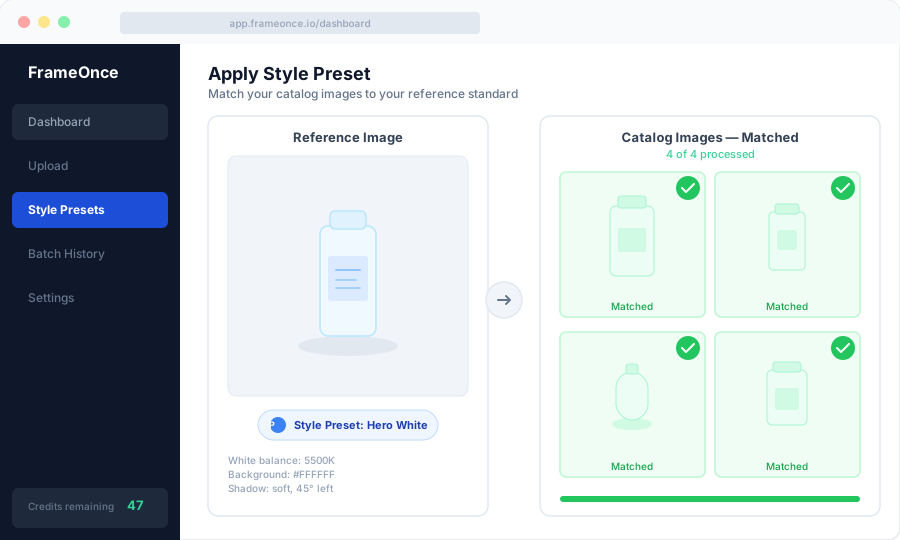
FrameOnce is built specifically for this catalog-level consistency problem. You create a Style Preset from a reference image — one photo where your lighting, background, color, and crop are exactly right. FrameOnce then automatically matches every subsequent image to that reference.
It doesn't replace good lighting setup — it ensures that the excellent lighting you establish on day one remains the standard on day 200, regardless of equipment drift, multiple photographers, or session-to-session variation.
To be clear: FrameOnce normalizes the real photos you took. It does not generate stand-in product imagery or fabricated lighting setups — your actual photograph is still the source of truth (see our Real Photos policy).
FrameOnce's free tools are live now. Run a free shop critique to see exactly where your catalog drifts, no signup needed. The full paid catalog workflow (Style Presets, batch processing, Etsy/Shopify integration) is in private testing and launches summer 2026; join the waitlist for double credits when paid plans are ready.
Product Photography Lighting Equipment Summary
For a complete breakdown of lighting equipment by budget, see our product photography equipment guide. The essentials:
Minimum: Two LED desk lamps with daylight bulbs (5000–6500K). Not ideal but functional for simple, non-reflective products. Cost: $20–$40. For the broader workspace context, see our product photography setup guide; for cost tradeoffs between DIY and hiring out, see our product photography pricing guide.
Recommended: Two LED softboxes, CRI 95+, adjustable color temperature, on stands. Cost: $80–$200 for the pair.
Professional: Two LED panel lights with large softboxes (90cm or larger), separate background light, color calibration card for custom white balance. Cost: $300–$800.
Frequently Asked Questions
What is the best lighting for product photography?
Two LED softboxes with CRI 95+ in a standard two-light arrangement (key at 45 degrees left, slightly above; fill at 45 degrees right, at product height, at 50–70% key light brightness). This setup handles the majority of product categories effectively and costs under $200.
Can I use natural light for product photography?
Yes, for lifestyle and social content. For catalog work requiring consistency across many sessions, continuous LED lighting is more reliable. Natural light changes throughout the day and across seasons.
What color temperature should I use for product photography?
5500K (daylight balanced) is the standard for most product photography with LED lights. Set this as a fixed Kelvin value in your camera — do not use Auto White Balance.
Why does my background look grey instead of white?
Either your lights aren't powerful enough, the background is too close to the product, or you need a dedicated background light. Position your background 3–4 feet behind the product and add a third light aimed directly at it.
How do I avoid reflections in shiny products?
Use diffused light sources (softboxes, lightbox, or window diffusion panel). For highly reflective products like jewelry and polished metal, cross-polarization (polarizing filter on lens + polarizing gels on lights) eliminates most reflections. For glassware, use backlighting.
How do I keep my lighting consistent between sessions?
Document everything: tape marks for light positions, written power settings, fixed white balance, measured camera distance. Then compare each new session's first test shot against a reference image before shooting.
Summary
Product photography lighting is a learnable, reproducible skill — not a mysterious art. A two-light LED setup handles most product categories. Camera settings are straightforward once you know the logic. The real challenge — and the real differentiator between good product photographers and great ones — is building a setup that produces the same result every session, across every product in your catalog.
Start with a two-light softbox setup, document everything, set a fixed white balance, and shoot at ISO 100 with f/8–f/11. Then use those results as your baseline to optimize from.
Ready to maintain that consistency at catalog scale? Run a free shop critique to see exactly where your photos drift today — no signup needed. Or join the waitlist for double credits when the paid catalog workflow launches summer 2026.
FrameOnce Team
FrameOnce Team
Related Articles
Product Photography Equipment: What You Actually Need (and What You Don't)
The complete product photography equipment list by budget tier: from $50 phone setups to full studio rigs, with what's worth buying and what to skip.
White Background Product Photography: The Complete Guide for E-Commerce
How to shoot white background product photos for Amazon, Etsy, and Shopify: setup, lighting, and editing for a perfectly consistent product catalog.
How to Photograph Jewelry: 10 Tips for Catalog-Ready Results
Learn how to photograph jewelry at home: macro lens setup, lighting to control reflections, focus stacking for 3D pieces, and camera settings for ecommerce.
Stay Updated
Honest product photography tips delivered to your inbox. FrameOnce enhances the photos you take, real photos, never generated.