Catalog Photography: How to Keep 100+ Product Photos Looking Like One Cohesive Brand
Keep 100+ product photos looking cohesive: workflow, lighting standards, color management, and tools for ecommerce sellers at scale.
There's a moment every growing ecommerce store hits where the photography workflow that worked for 20 products starts breaking at 100. The catalog stops looking like one cohesive brand and starts looking like a collage of different stores. Lighting drifts session by session. Colors don't match between batches. Background tones shift. Frame sizes vary. Customers can't articulate why your store feels less professional than competitors, but they feel it, and they convert at lower rates.
This guide is about the discipline of catalog photography: not how to take one great photo, but how to take 200 photos over six months that all look like they belong together. It's the unglamorous, repetitive, systems-driven side of product photography that determines whether your store reads as a real brand or a hobby.
If you're still working on the basics of taking individual product photos, start with our complete product photography guide, then come back here when you're ready to think about scale.
What Makes a Catalog "Consistent"
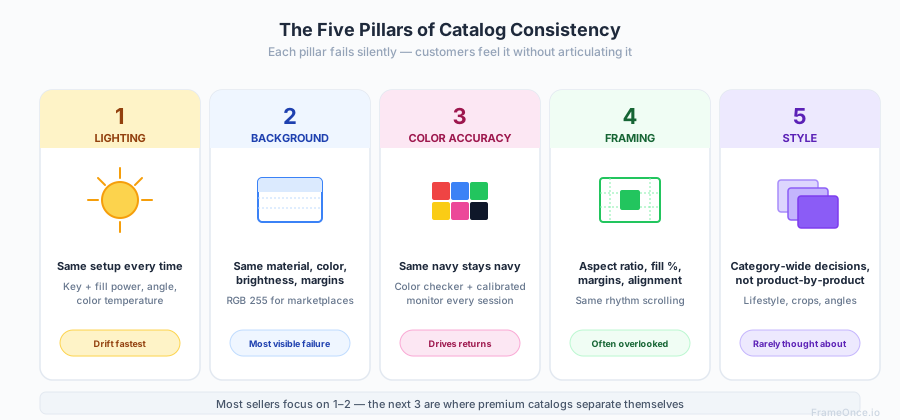
Catalog consistency isn't a single quality. It's the absence of noticeable differences across hundreds of small visual variables. The most common ones:
Lighting consistency. Every product photographed under the same key/fill/background light setup, with the same intensity, the same color temperature, and the same direction. A product shot on a cloudy Tuesday should match a product shot on a sunny Friday.
Background consistency. The same background material, the same color, the same brightness, the same crop margins around the product. Customers should not be able to tell which products were shot in different sessions.
Color accuracy. Whites should be identical across products. Blacks should match. The brand colors of garments and packaging should render the same way every time.
Framing consistency. Same aspect ratio, same product-to-frame ratio, same vertical and horizontal alignment, same negative space. Browsing the catalog should feel like a steady rhythm, not a series of slightly-different decisions.
Style consistency. If you use lifestyle shots for some products, you should use them for all products in that category. If you crop tightly on jewelry, you should crop tightly on every piece of jewelry. The decisions should be category-wide, not product-by-product.
The combined effect of these dimensions is what makes a brand feel "professional" to a casual browser. Most sellers focus on the first two, partially address the third, and never think about the last two. That's where catalogs start drifting.
The Cost of an Inconsistent Catalog
Catalog inconsistency isn't a cosmetic problem. It has measurable business consequences.
Conversion rates drop. Customers who can't tell whether a brand is established or amateur default to assuming amateur. Stores with visually consistent catalogs tend to convert at meaningfully higher rates than stores with mixed photography across the same products at the same prices. The exact lift varies by category and price point, but the directional effect shows up consistently in catalog reviews.
Returns increase. When colors render differently between products, customers are more likely to receive items that don't match their expectations. The "color was different in person" complaint is often a photography consistency problem, not a product problem.
Trust erodes silently. Customers don't usually leave reviews complaining about photography. They just don't come back. The damage shows up as low repeat purchase rates and weak organic growth, not as direct feedback you can act on.
Brand value caps out. A catalog that looks inconsistent prevents you from charging premium prices, regardless of product quality. The visual experience anchors the perceived value.
The frustrating part: solving this requires no additional creative skill. It requires process discipline. Most sellers who can take one great photo can take 200 great photos that match. They just don't have a system that makes consistency the default outcome.
Building a Catalog Photography System
A catalog photography system is the documented set of decisions and workflows that make consistent output the path of least resistance. Without a system, every shoot starts with re-deciding the same questions. With a system, every shoot starts with executing predetermined answers.
The pattern I see most often: sellers know what their best products look like, but they can't articulate WHY those photos work. They can't replicate it on demand because the decisions live in their heads, not in a written standard. The first job of any catalog system is making those decisions visible and repeatable.
Step 1: Document Your Visual Standard
Before photographing anything, write down the exact decisions for your catalog:
Background. What color? What material? What texture? Pure white seamless paper or warm beige linen? Document the exact product (e.g., "Savage Universal #1 Super White seamless, 53-inch roll").
Crop ratio. 1:1 square for marketplaces? 4:5 portrait for Pinterest-friendly listings? Pick one and apply it everywhere in a category.
Product fill. What percentage of the frame should the product occupy? (Amazon requires 85% for main images. For lifestyle shots, decide on a category-wide standard.)
Margins. How much consistent whitespace around each product? Top, bottom, left, right.
Shooting angle. Straight-on for clothing on mannequins? 45-degree for products with depth? Top-down for flat lay items? Document by category.
Color targets. Reference standards for whites, blacks, and your brand's key colors. Set these from a calibrated monitor.
This document doesn't need to be elaborate. A single page with reference images for each category is enough. The point is removing decisions during shoots, not creating bureaucracy.
Step 2: Standardize Your Lighting Setup
Lighting is where catalogs drift fastest and where the drift is most visible to customers. Lock it down with mechanical precision.
Mark light positions with floor tape. Every session starts with placing lights on identical marks. Measure light-to-subject distance with a tape measure.
Use fixed-power LED lights, not flashes. LEDs let you see exactly what you're shooting. Flash output varies subtly between shots; continuous LED light doesn't.
Set color temperature explicitly. 5500K for daylight-balanced LEDs. Never use auto white balance on the camera. Custom white balance from a gray card at the start of every session.
Document your settings. Aperture, shutter, ISO, white balance, light power levels. A laminated card next to your shooting station prevents drift.
For the foundational lighting principles, see our product photography lighting guide. For specific setups by product type, the setup guide covers workspace standardization in detail.
Step 3: Build Shot List Templates
For each product category, define the exact shots required:
Apparel: front view, back view, 45-degree, detail shot, scale reference, lifestyle.
Jewelry: hero shot, side angle, scale (worn or with reference), detail/macro, packaging (if branded).
Home goods: assembled view, in-use context, detail shots of materials, scale reference.
Beauty/cosmetics: front of packaging, back of packaging (with ingredients), product in use, swatch test, scale.
The shot list becomes a checklist that every photographer follows for every product. No improvisation about "we probably have enough." The list defines completion.
Step 4: Batch by Method, Not by Order
The most common scaling mistake: shooting products in the order they arrive. This means constantly switching setups (flat lay one minute, mannequin the next, lifestyle after that), wasting time on changes and introducing inconsistency.
Instead, batch by shooting method:
Session 1: Every product that gets a flat lay shot. Set up the overhead camera once.
Session 2: Every product that gets a hero shot on white background. Lock the lighting and shoot through the queue.
Session 3: Every product that gets a lifestyle shot. Build the styled set once and rotate products through.
This approach cuts session time by 30-40% and dramatically improves consistency within each batch.
Step 5: Lock Camera Settings as a Custom Profile
Most cameras let you save settings to a custom mode. Save your catalog photography settings (ISO 100, aperture f/8, custom white balance, manual focus, JPEG fine + RAW) as Custom Mode 1.
Every catalog session starts by switching to that mode. No second-guessing, no drift.
For phone-based catalogs, our smartphone product photography guide covers how to lock equivalent settings on iPhone and Android.
Color Management for Catalog Photography
Color drift across a catalog is the single most expensive consistency failure. Customers who receive products that look different from the website complain, return, and don't come back.
The Color Pipeline
Capture accurately. Custom white balance on every session. Shoot in RAW format. Use a color checker (X-Rite ColorChecker Passport at $90, or Datacolor SpyderCheckr at $60) to create a reference profile for your specific lighting setup.
Edit consistently. Apply the same color correction profile to every image in a batch. In Lightroom, this means creating a custom camera profile from your color checker shot and applying it as a preset.
Display correctly. Your editing monitor must be calibrated. Even a basic calibration tool ($150-$200, Datacolor Spyder or X-Rite i1Display Studio) prevents the scenario where colors look right on your screen but wrong on every customer's screen.
Export to consistent color space. sRGB for web, always. Embedded color profile in the JPEG. This ensures browsers render colors as you intended.
Catching Color Drift
Even with disciplined process, color drift creeps in over time. Periodic catalog audits catch it before it spreads:
Quarterly review. Every three months, pull your most recently photographed products alongside products from one year ago. Place them side by side at the same scale. Drift becomes obvious.
Side-by-side category check. When releasing a new product into an existing category, compare the new images side by side with the existing 3-5 best-sellers in that category. Anything that looks "different" needs reshooting before launch.
Customer feedback as signal. "The color was different than the photos" reviews are color management failures, not customer error. Track them by product and by photo session. Patterns reveal where your process is leaking.
The Catalog Photography Workflow
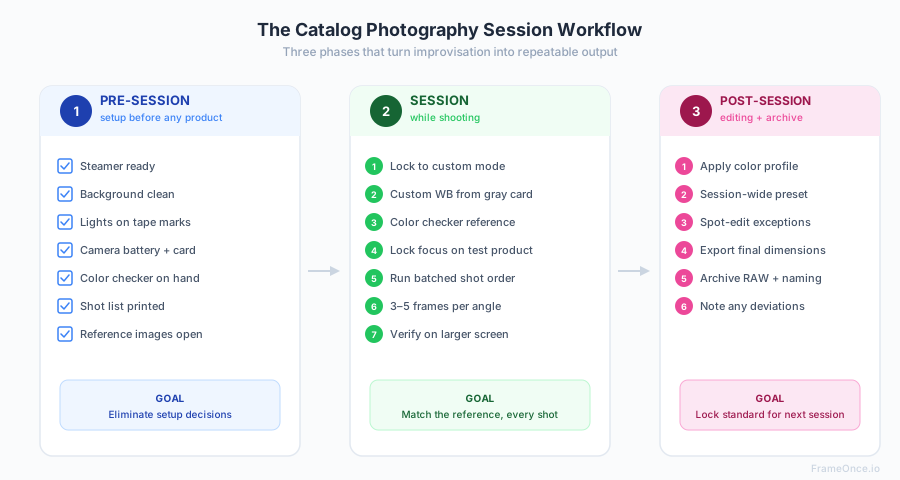
A repeatable session workflow ensures consistency from session to session, even when different people are shooting.
Pre-Session Checklist
- Steamer plugged in and ready
- Background material clean and wrinkle-free
- Lights placed on tape marks
- Camera battery charged, memory card formatted
- Color checker available
- Shot list printed for the products being shot
- Reference images from previous sessions accessible
Session Workflow
- Lock camera settings to custom mode
- Set custom white balance from gray card under your lights
- Shoot color checker reference shot (this becomes your color profile reference)
- Lock focus on a test product to verify sharpness
- Run through products in batched order (flat lay batch → hero shot batch → detail batch)
- Take 3-5 frames per shot for selection in editing
- Verify each product on a larger screen before moving on (transfer to laptop or tablet, check critical sharpness and lighting)
- Re-shoot anything that doesn't match the reference before tearing down
Post-Session Workflow
- Apply color profile from the color checker reference
- Apply session-wide preset for exposure, white balance, sharpness
- Spot-edit individual products for any unique adjustments
- Export to final dimensions at consistent quality (JPEG 90%+ for web)
- Archive RAW files with clear naming (YYYY-MM-DD_product-name_angle)
- Note any process deviations for the next session
This workflow takes discipline to maintain but prevents the drift that compounds session by session.
When to Outsource Catalog Photography
The economics of catalog photography change as your catalog grows. Here's the rough framework:
Under 50 products, low monthly addition rate (under 5/month): DIY is almost always the right answer. Setup costs amortize, and the consistency control benefits of in-house shooting outweigh the time cost.
50-200 products, moderate addition rate (5-20/month): Hybrid approach. Hire a freelance photographer for the initial catalog build (consistent style across the full set), then handle additions in-house using the established style as a reference.
200+ products, high addition rate (20+/month): Dedicated photography studio or in-house team. The volume justifies fixed costs of professional setup, and the consistency control is too important to leave to ad-hoc freelancers.
Special case — apparel catalogs of any size: Consider studio outsourcing earlier. Apparel has the most visible consistency issues (wrinkles, color, fabric drape) and the highest return rates from photo mismatches. The professional polish of a studio environment often pays for itself even at smaller catalog sizes. See our apparel photography guide for the scaling considerations specific to fashion brands.
For pricing details across freelance, studio, and in-house options, our product photography pricing guide breaks down the full cost spectrum.
Catalog Consistency Tools
Manual consistency through process discipline works but has a ceiling. As catalogs grow beyond 100 products, the time required for manual matching becomes a real bottleneck. This is where tooling enters.
Lightroom Presets and Camera Profiles
The free baseline. Build presets for each shooting scenario (flat lay, hero shot on white, lifestyle), apply them across batches, fine-tune individual images. Sufficient for catalogs up to about 200 products.
Capture One Sessions
Higher-end tethered shooting and color management workflow. Better than Lightroom for studio environments where consistency control needs to happen during the shoot, not after. Subscription cost is significant.
Automated Consistency Tools (Enhancement, Not Generation)
For catalogs above 100 products, automated consistency tools become essential. Instead of manually matching every image, you define your visual standard once (the exact exposure, white balance, shadow behavior, and background tone you want) and apply it programmatically across every image. The important distinction: these tools enhance the real photographs you already shot, they do not generate fake products from prompts.
FrameOnce is built for exactly this workflow. You perfect one product photo, getting the lighting, color, and consistency exactly right, save it as a Style Preset, and apply that standard across your entire batch. FrameOnce analyzes each of your real photos individually and makes the specific adjustments needed to match your preset, accounting for the variations in lighting and color that inevitably creep in across sessions. We never generate stand-in products or fabricated imagery — every output represents real inventory you can ship (see our policy).
The result: a catalog where the first product you photographed in January looks like it was shot in the same session as the 200th product you photographed in March, without the manual matching time cost.
Catalog Photography for Specific Marketplaces
Different platforms have different consistency requirements. The principles above apply universally, but platform-specific rules add layers.
Amazon catalogs: Strict white background requirement (RGB 255,255,255), 85% product fill, category-specific rules for apparel, jewelry, electronics, supplements, and home goods. Full compliance details in our Amazon product photography guide.
Shopify catalogs: No platform-imposed background requirement, but consistency across your store matters more than for marketplaces. Use the same image dimensions (2048x2048 recommended), same padding, same background treatment for every product. See our Shopify product image size guide for all dimension specifications.
Etsy catalogs: Most creative freedom of any major platform. The algorithm rewards listings with 5+ images and lifestyle/styled photography performs well. The first listing image should still be a clean, clear product shot; lifestyle images go in positions 2-5.
Multi-platform catalogs: Shoot once at the highest specs (2000px+, square aspect ratio, white background) and crop or restyle for each platform. This is more efficient than re-shooting for each marketplace.
What to Do Next
Catalog consistency is a discipline problem, not a creative problem. The single biggest improvement most ecommerce sellers can make to their photography is not better individual photos. It's a system that ensures the photos they already take are consistent with each other.
Start by documenting your current visual standard, even if it's been implicit until now. Write down the background, the lighting setup, the crop ratio, the angle, the margins. Now you have a reference to compare against.
Next session, set up against that reference. Mark your light positions with tape. Lock your camera settings. Run your shot list. Compare results to existing catalog images before you tear down.
If you're at the scale where manual consistency is breaking down, that's where systematic consistency tools become essential. We cover the full framework — the five dimensions of consistency, why "be more careful" fails at scale, and the post-production approach that fixes it — in our deep dive on product photo consistency at scale. FrameOnce is built around that exact framework.
For the broader photography fundamentals, our product photography setup guide covers the workspace, the equipment guide covers the gear, and the lighting guide covers the light positioning that makes consistency possible.
FrameOnce Team
FrameOnce Team
Related Articles
Product Photo Consistency: The Catalog Killer Most Sellers Ignore
Inconsistent product photos quietly kill conversions. Why catalog consistency matters and how to achieve it across hundreds of products at scale.
Smartphone Product Photography: How to Get Professional Results With Your Phone
Pro product photos from your phone: iPhone and Android settings, DIY lighting, backgrounds, and editing for Etsy and Shopify sellers.
Amazon Product Photography Requirements: Complete 2026 Compliance Guide
Every Amazon product image rule in one place: white background specs, dimensions, file formats, and 2026 category-specific requirements.
Stay Updated
Honest product photography tips delivered to your inbox. FrameOnce enhances the photos you take, real photos, never generated.