How to Photograph Jewelry: 10 Tips for Catalog-Ready Results
Learn how to photograph jewelry at home: macro lens setup, lighting to control reflections, focus stacking for 3D pieces, and camera settings for ecommerce.
How to Photograph Jewelry at Home: What You Need to Know
Photographing jewelry at home is entirely achievable — but it's one of the most technically demanding product categories in ecommerce. You're dealing with reflective metal, tiny gemstone facets that need to sparkle without blowing out, and pieces so small that every fingerprint shows at full resolution. Professional photographers routinely spend six hours staging, lighting, and shooting a single piece — and just as long editing it.
The good news: most of that time is wasted on setup that isn't repeatable. Once you nail these 10 fundamentals, you can move through a full jewelry shoot efficiently and produce images that hold up on Shopify, Amazon, Etsy, and anywhere else your listings live. For general ecommerce photography principles, our complete product photography guide is a useful companion to this one.
1. Clean Every Piece Before You Touch the Camera
This sounds obvious. It isn't obvious enough.
Jewelry photography is essentially macro photography. Your images will show details the naked eye misses entirely — including every fingerprint, smudge, surface scratch, and speck of dust. A piece that looks flawless in your hand can look dull and dirty at full resolution.
Before every shoot: clean each piece with mild dish soap and warm water using a soft brush, then dry with a microfiber cloth. For delicate gemstones, use a method appropriate for that specific material. Once clean, handle only with cotton gloves — no exceptions.
This one habit will save you hours of retouching time.
2. Use a Macro Lens with a 1:1 Magnification Ratio
Standard kit lenses simply cannot capture the detail that jewelry photography demands. A true macro lens with a 1:1 magnification ratio means the subject is projected onto the sensor at its actual real-world size — giving you the resolution to show gemstone facets, metal grain, and engraving detail clearly.
The most widely used focal lengths for jewelry macro work are 100mm and 105mm. The longer focal length gives you more working distance between the lens and the piece — critical for getting lights and props in place without crowding the subject or casting shadows. Canon's 100mm f/2.8L Macro and Nikon's 105mm f/2.8G are industry standards. Sigma's 105mm f/2.8 DG DN Macro is a strong, lower-cost alternative compatible with multiple systems.
For smartphone photographers, a clip-on macro lens attachment can get you significantly closer detail — but look for one with example images from real users before buying, as magnification specs on these accessories are often unreliable.
3. Lock Your Camera on a Tripod
At macro distances, even the vibration from pressing the shutter button is enough to introduce blur. A tripod isn't optional for jewelry photography — it's foundational. It lets you use lower ISO settings without compensating with faster (and potentially underexposed) shutter speeds, and it's the only way to shoot focus stacks accurately (more on that in Tip 6).
Use a remote shutter release or your camera's self-timer to eliminate contact blur entirely. If your camera has mirror lock-up (DSLR) or an electronic shutter option (mirrorless), use it.
4. Set Your Camera to Manual Mode
Auto mode and aperture priority cannot consistently handle jewelry. Reflective metal surfaces confuse metering systems — your camera may underexpose a piece on a bright white background or overexpose a dark pendant on a dark surface.
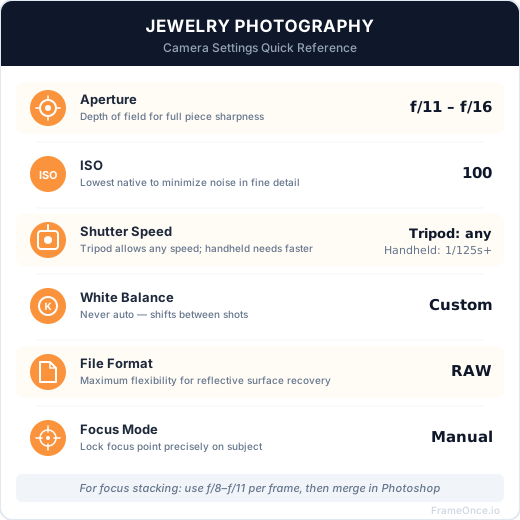
Verified settings for jewelry photography:
- Aperture: f/11 to f/16 — this range delivers the depth of field needed to keep an entire ring or pendant sharp from front to back
- ISO: 100 (or the lowest native ISO your camera allows) — keeps noise out of fine detail
- Shutter speed: Let the exposure meter guide you, but aim for 1/100s or slower on a tripod — faster if you're using flash sync
- White balance: Set a custom white balance matched to your lights — do not use auto white balance, which will shift between shots and destroy color consistency
- File format: Shoot RAW — the flexibility in post for white balance, exposure, and highlight recovery is essential with reflective surfaces
5. Use Diffused Light to Control Reflections
Bare flash and undiffused LED panels are the enemy of jewelry photography. Direct light on a shiny surface creates hot spots that blow out detail and produce reflections that show the room, your camera, and sometimes your own image in the piece.
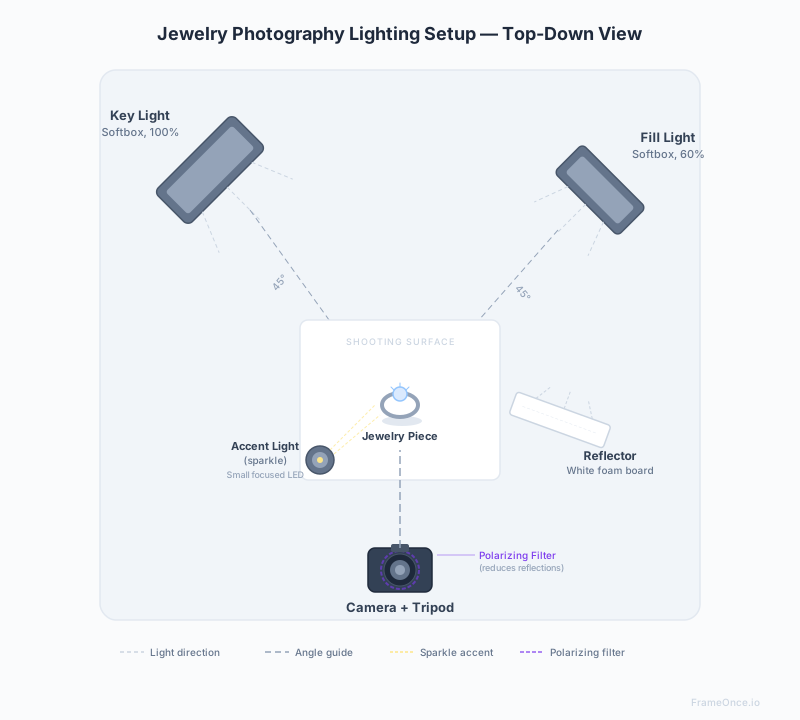
Three approaches that work:
Lightbox / Light tent: The most reliable setup for beginners. The diffused, enclosed environment eliminates most reflections automatically. Models like Neewer's 20-inch collapsible tent (~$30) work well for smaller pieces. Limitation: less creative control over light direction.
Two softboxes with diffusion panels: Key light positioned at 45° to the upper left, fill light at 45° to the upper right (slightly further away to maintain shadow). Position a white foam core reflector on the shadow side to bounce light back and fill in harsh shadows without adding another light source.
Natural light from a window: Position your setup 90° to the window — not facing it directly. Bright overcast days give you naturally diffused, even light. Use a white foam board on the opposite side to fill shadows. Avoid direct sunlight, which creates harsh reflections and shifts color temperature as clouds move.
For gold, diamonds, and highly polished metals, a polarizing filter on your lens combined with polarizing gels on your lights (cross-polarization) can remove up to 90% of surface reflections while still preserving gemstone sparkle.
6. Use Focus Stacking for Rings and 3D Pieces
Here's the core technical challenge of jewelry macro photography: at f/11 to f/16 and close focus distances, depth of field is measured in millimeters. A ring photographed from a slight angle will have the stone in focus and the band blurry, or vice versa. You cannot fix this with aperture alone — going narrower than f/16 introduces diffraction softness that costs you more sharpness than you gain.
Focus stacking solves this. You take multiple shots of the same piece, each focused on a different depth — front of the stone, middle of the band, back of the band — then merge them in post-processing so every part of the piece is tack sharp.
For focus stacking: set aperture to f/8 to f/11 (to avoid diffraction), ISO 100, and manually shift focus between shots in small increments. Merge in Photoshop using Edit > Auto-Blend Layers, or use dedicated software like Helicon Focus. Newer cameras including the Nikon Z6 III and Olympus OM-1 have in-camera focus bracketing that automates the capture process.
For flat, simple pieces — thin chains, earrings shot straight-on — focus stacking is optional. For rings, bracelets, pendants with depth, and any piece shot at an angle, it's worth the extra five minutes.
7. Choose Your Background Based on the Metal
Background choice isn't just aesthetic — it directly affects how metals read on screen.
Pure white (RGB 255,255,255): Required as the main product image on Amazon — see our Amazon product photography requirements guide for the full jewelry category rules including scale reference and zoom specs. Standard for Shopify. Creates a clean, neutral presentation that works for any metal. Use white foam board or a paper sweep. Note that bright white backgrounds can make silver look grey — compensate with light placement.
Off-white or cream: Slightly warmer presentation. Works well for gold and rose gold, which can look washed out against stark white.
Black or dark grey: Creates dramatic contrast for silver, white gold, and platinum. Makes polished metals look striking. Less suitable for darker stones.
Marble, wood, and textured surfaces: Strong for lifestyle and editorial shots — Instagram, Pinterest, email campaigns. Not suitable for main ecommerce listings on platforms with white background requirements.
The practical rule: shoot your hero product images on white for compliance with major platforms, then shoot one or two lifestyle images on a contextual surface for social and email.
8. Prop and Position Pieces Intentionally
How a piece sits in frame matters as much as how it's lit. A necklace in a pile looks cheap. A necklace carefully arranged on a clean surface or draped over a subtle riser looks curated.
Practical tools:
- Blu-Tack or museum putty: Invisible in photos, holds pieces in the exact position and angle you want
- Fishing wire: Suspends earrings and lightweight pendants in mid-air — the wire retouches out cleanly in post
- Ring cone or finger stand: Keeps rings upright and consistent between shots
- White foam core risers: Elevates pieces slightly, adds subtle dimension, keeps them off the background surface
For earrings, shoot pairs together and apart. For rings, shoot straight-on and at a 45° angle to show depth.
How to Photograph Necklaces
Necklaces need special attention because of their length and the way they drape. Two approaches work best:
Flat lay: Arrange the necklace in a deliberate shape — a simple arc or symmetric loop — on your white background. Use Blu-Tack to hold the clasp and any sections that tend to shift. Photograph from directly above. This works best for delicate chains and pendants where the design detail is the story.
Draped on a riser or bust: A fabric-covered jewelry bust or a simple foam riser gives necklaces a 3D presentation that flat lay can't replicate. It shows how the piece hangs and the relative length on a body — information that reduces purchase hesitation for customers who can't try it on. For Amazon main images, use a white or very light-colored display that doesn't distract from the piece itself.
9. Edit for Color Accuracy, Not Just Brightness
Post-processing jewelry photos is where color accuracy matters most. A gold ring that photographs slightly warm looks cheap. A diamond that photographs slightly blue looks cold and industrial. Your goal is to match what the piece actually looks like in person.
Workflow:
- Correct white balance first — adjust until metal tones match the actual piece
- Recover highlights on bright metal surfaces using the Highlights slider in Lightroom or Camera Raw
- Apply selective sharpening to gemstones and metal edges — leave backgrounds unsharpened
- Use Photoshop's Unsharp Mask (Amount: 60, Radius: 1, Threshold: 3) as a finishing step for crisp detail
- Export as JPEG at the correct dimensions for each platform (see our Shopify image size guide)
If you're doing focus stacking, complete the stack merge in Photoshop before bringing into Lightroom for color correction.
10. Build a Repeatable Setup — Not Just Good Photos
This is the tip that separates hobbyist jewelry photography from catalog-level production.
A single beautiful photo of a ring is not hard to produce. 200 beautiful photos of 200 rings that all look like they belong together in the same catalog — same light, same color temperature, same crop, same metal rendering — that's the real challenge of jewelry ecommerce photography.
The way you get there is documentation. Write down every setting you use. Measure and record your light positions. Note which background you used and where the camera sat relative to the subject. Take a reference photo of your full setup at the start of every session. Lock your white balance to a specific preset rather than auto.
Most sellers skip this entirely. They produce great individual images but their catalog looks inconsistent — different white balance, different crop ratios, slightly different background tones across pieces photographed weeks apart. On a product grid, that inconsistency signals low quality before a shopper reads a word of copy.
The Catalog Consistency Problem
Even if you master all 10 tips above, there's a layer of consistency that's difficult to maintain manually: how your entire jewelry catalog looks together across time, sessions, and potentially different photographers.
You can nail your settings on Monday's ring shoot, then photograph earrings six weeks later and find the background reads slightly warmer, the metal tones have shifted, the crop ratio drifted. Each image is technically good. But side by side on a product grid, they look like they came from different stores.
This is exactly what FrameOnce solves. Instead of relying on written notes and manual matching, you create a Style Preset from a reference image — and FrameOnce automatically matches new product photos to that reference for background tone, lighting character, crop, and overall visual consistency. Your 200th jewelry photo matches your first, regardless of when it was shot.
Important boundary: FrameOnce enhances the real jewelry photos you took. It does not generate fake pieces, fake hands holding the jewelry, or fabricated scenes — your buyer is still seeing the actual ring, earring, or necklace they will receive (read our Real Photos policy).
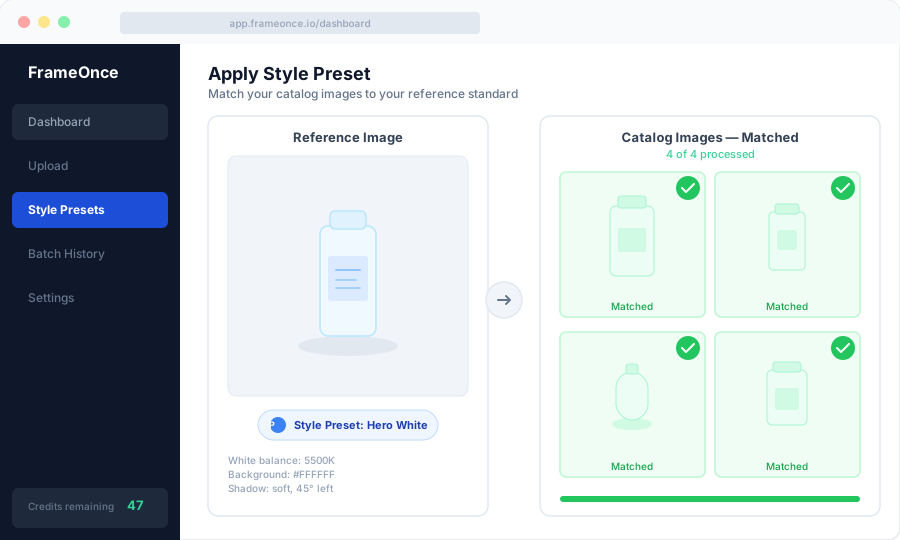
FrameOnce's free tools are live now. Run a free shop critique to see exactly where your catalog drifts, no signup needed. The full paid catalog workflow (Style Presets, batch processing, Etsy/Shopify integration) is in private testing and launches summer 2026; join the waitlist for double credits when paid plans are ready.
Quick-Reference Checklist
Before every jewelry shoot
- Clean each piece with soft brush and mild soap, dry with microfiber
- Handle with cotton gloves after cleaning
- Camera on tripod with remote shutter release
- Manual mode: f/11-f/16, ISO 100, custom white balance, RAW
- Lights diffused — softboxes, lightbox, or overcast natural light
- Foam core reflector positioned on fill side
- Background chosen and positioned
- Reference shot of full setup taken for documentation
Frequently Asked Questions
Do I need an expensive camera for jewelry photography?
Not necessarily. Modern mirrorless cameras like the Canon EOS R50 (~$679) perform excellently for jewelry at low ISO. A smartphone with a clip-on macro lens attachment can produce usable ecommerce images for lower budgets. The macro lens matters more than the camera body — a strong macro lens on a mid-range body beats a standard lens on an expensive body.
How do I photograph diamonds and gems without losing the sparkle?
Diffused light maintains base sharpness but can reduce sparkle. The trick is to add a small, focused LED light source — a tight-beam LED pen or small LED panel — pointed at the stone from an angle to create the internal light refraction that makes diamonds appear to glow. Use it as a secondary accent, not your main light source.
How long does a typical jewelry shoot take?
A professional photographer with an established setup can shoot 15-25 simple pieces per hour. Complex pieces requiring focus stacking, multiple angles, and detail shots will take significantly longer — budget 20-30 minutes per piece for thorough coverage. Post-processing adds additional time per image.
What's the best background for Amazon main images?
Pure white (RGB 255,255,255) is required for Amazon main product images. The product must fill at least 85% of the frame. Use a white paper sweep or foam board and verify the background reads as true white in your histogram before shooting — not off-white or cream.
Should I include lifestyle images alongside my white background shots?
Yes. Product listings with both white background and lifestyle images consistently outperform white-only listings. Lifestyle images showing jewelry being worn help shoppers understand scale, how pieces drape, and how they look against skin — information the isolated product shot can't convey. Aim for at least one on-body lifestyle image per SKU alongside your main product shots.
Summary
The 10 fundamentals: clean your jewelry thoroughly before shooting, use a macro lens with 1:1 ratio, lock everything on a tripod, shoot manual at f/11-f/16 with ISO 100, diffuse your light to control reflections, use focus stacking for 3D pieces, match background to metal tone, prop pieces intentionally, edit for color accuracy over brightness, and build a repeatable setup you can return to consistently.
Master these ten and your jewelry photos will hold up against professionally produced catalog images — and your listings will show it.
For the full lighting setup and camera settings breakdown applicable to any product, see our product photography setup guide. For pricing if you're deciding whether to shoot in-house or outsource your jewelry photography, see our product photography pricing guide.
Ready to make your entire jewelry catalog look this consistent? Run a free shop critique to see exactly where your photos drift today — no signup needed. Or join the waitlist for double credits when the paid catalog workflow launches summer 2026.
FrameOnce Team
FrameOnce Team
Related Articles
Product Photography Equipment: What You Actually Need (and What You Don't)
The complete product photography equipment list by budget tier: from $50 phone setups to full studio rigs, with what's worth buying and what to skip.
Product Photography Lighting: A Complete Guide to Consistent Results
Product photography lighting guide: natural vs. artificial setups, camera settings, softbox positions, and consistency techniques for ecommerce catalogs.
White Background Product Photography: The Complete Guide for E-Commerce
How to shoot white background product photos for Amazon, Etsy, and Shopify: setup, lighting, and editing for a perfectly consistent product catalog.
Stay Updated
Honest product photography tips delivered to your inbox. FrameOnce enhances the photos you take, real photos, never generated.